
Local Services Ads Are Moving Into Google Ads: What Changes for Home Service Businesses (and What to Save First)

If you run Local Services Ads for a plumbing, HVAC, roofing, moving or other home service company, the dashboard you log into is going away. Google is moving every Local Services Ads campaign into the main Google Ads platform, as a special Performance Max campaign type with "pay-per-lead goals" (Google Ads Help: Local Services Ads transition to Performance Max campaigns with pay-per-lead goals).
The good news first: your ads will still show in the same places, and you will still pay per lead, not per click. But a few things that matter to your budget do change, and one of them can't be undone: your old performance reports don't move with you. This guide covers what changes, what stays the same, and what to save and check before and after your account moves. Everything here comes from Google's help pages as they read on November 12, 2026. Google updates them often, so check the current version before you make a budget decision.
The short version
- Same: pay per valid lead, ads on Google Search and Google Maps only, no keywords, your past leads and call recordings.
- Different: you manage everything in Google Ads, weekly budgets become daily averages, manual bidding ends, per-trade target costs merge into one, BBB callouts go away, and manual lead disputes end.
- Lost if you don't act: your Local Services Ads performance reports (past impressions, clicks, weekly spend and ad-level results).
- When: in phases. U.S. home and storefront services started in August 2026; service-area businesses without a storefront follow in late 2026.
Who moves, and when
Google is migrating accounts in phases rather than all at once (Google Ads Help):
- August 2026: select home and storefront service advertisers in the United States, including plumbing, HVAC, electrical, appliance repair, house cleaning, lawn care, roofing, pest control and moving.
- Late 2026: broader groups, including service-area businesses without physical storefronts and accounts with custom bidding or booking setups.
- 2027: remaining business categories.
If you're a service-area business without a storefront and haven't moved yet, your turn is scheduled for late 2026. Some categories that need advanced verification, such as locksmiths and garage door services, stay on the old Local Services portal for now and are slated to move in 2027 (Google Ads Help: About pay-per-lead goals for Performance Max campaigns).
You will get notice. The account administrator listed on your profile receives an email 14 days before your migration date, sees warning banners in the dashboard, gets a reminder 7 days later and a confirmation once it's done. On migration day, logging into the old dashboard sends you to Google Ads instead (Google Ads Help). If that administrator email goes to a former employee or an agency you no longer use, you may never see the warning, so check who it is now.
What stays the same
Google is clear that the customer-facing side doesn't change. According to its migration page, you "still only pay for valid leads (such as phone calls and messages) rather than ad clicks," your ads "continue to show exclusively on Google Search and Google Maps in the same ad positions as before," and the campaign "remains keywordless," targeted by the service categories and areas you choose (Google Ads Help).
That's an important difference from a regular Performance Max campaign. Standard Performance Max charges per click and runs across YouTube, Gmail and the Display Network; the pay-per-lead version only serves on Search and Maps and charges for leads (Google Ads Help). Google's Ads Product Liaison, Ginny Marvin, explained the choice of Performance Max this way: it "is the only campaign type that serves on both Search and Maps inventory" (PPC Land).
Several other things carry over automatically:
- Your past leads. Customer contact details, message history and older call recordings move to the new Leads page in Google Ads.
- Your setup. Locations, service types, categories, budget limits, ad schedule and photos transfer without manual input.
- Your Google Verified badge. If you already passed verification, the badge transfers, and Google says insurance and license reverification are no longer required.
All three points come from Google's migration page. What counts as a valid lead also stays the same: an answered call, a missed call during business hours where the caller stays on the line more than 20 seconds, a voicemail, a text or email, or a booking request (Google Local Services Help: How leads work).
What changes
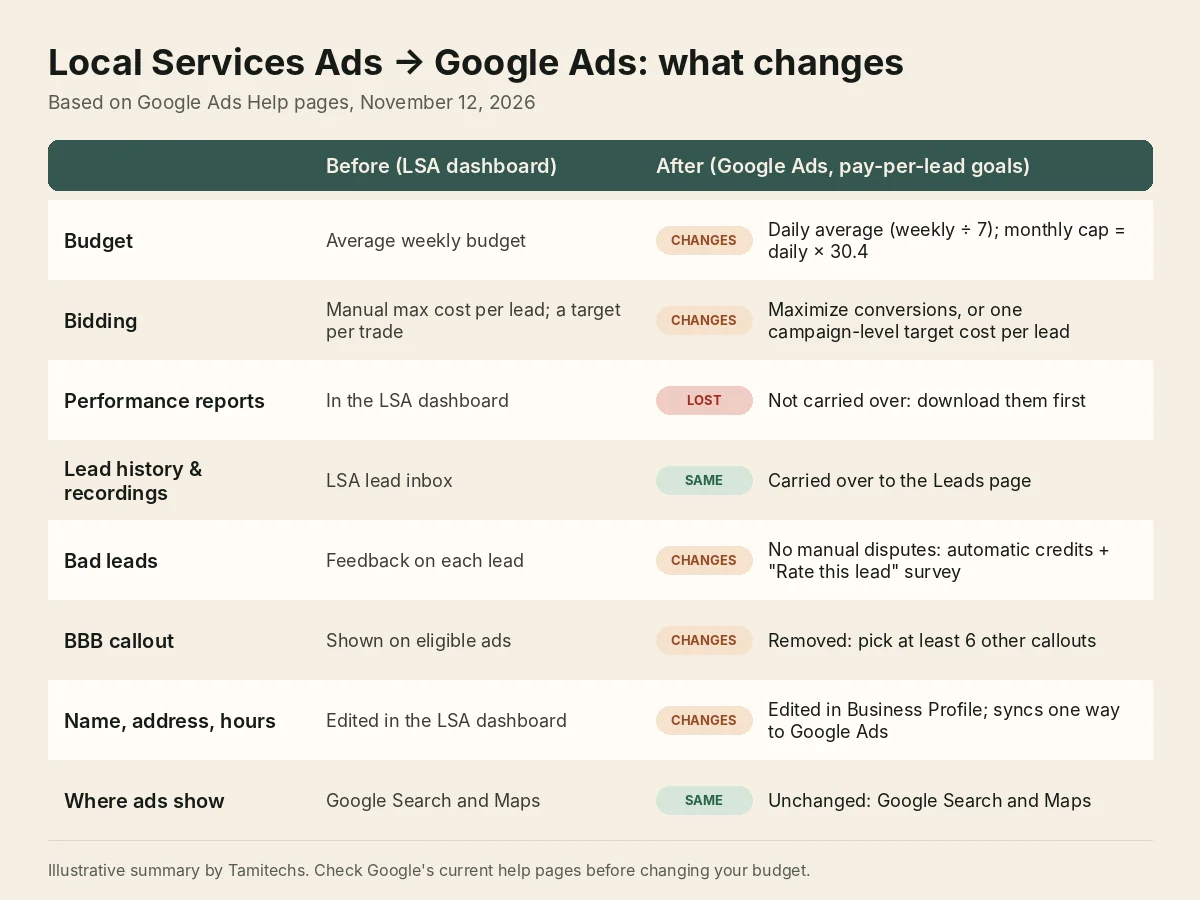
Illustrative summary by Tamitechs of Google's help pages cited in this article, as of November 12, 2026.
Budgets go from weekly to daily
Google takes your historical average weekly budget and divides it by 7 to set a daily average budget. Monthly spend is capped at that daily average times 30.4, and daily spend can run higher on busy days without the month going over the cap (Google Ads Help).
For example, a $700 weekly budget becomes a $100 daily average, with a monthly ceiling of $3,040. That is about the same money, but it looks different in reports. If your bookkeeper or owner checks spend by the week, expect some weeks to run above the old weekly number on busy days and others below it.
Manual bidding ends, and per-trade targets merge
Manual bidding, such as setting a maximum cost per lead, is no longer supported. Neither is a separate target cost per lead for each trade inside one campaign. If you ran different targets for, say, plumbing and HVAC, Google calculates one campaign-level target and applies it to every category. To keep separate targets, you have to split the trades into separate campaigns (Google Ads Help).
After the move you choose between two automated strategies: Maximize conversions (the default, which aims for the most leads within your daily budget) and Target CPA, where you set a target cost per lead. Google warns that "if your target is set too low to compete in your local market, your ads may not serve" (Google Ads Help: Lead quality and budgets for campaigns with pay-per-lead goals).
This is the change most likely to move your cost per lead. A company that kept a tight cap on drain-cleaning leads and a higher one on water heater installs now has to decide whether those jobs belong in one campaign or two. Make that call on your own job values, not on whatever blended number Google calculates.
Lead disputes become automatic credits plus a survey
Google says "manual lead disputes are no longer supported." Instead, its systems filter out spam, wrong numbers, solicitation and repeat callers who contact you again within 15 days, and credit invalid leads automatically. If a lead still looks wrong, you open it on the Leads page and complete the "Rate this lead" survey, which "can result in a reimbursement" shown in the Charge Status column (Google Ads Help). Google keeps assessing lead quality for 30 days and applies credits automatically when a lead turns out to be poor quality, duplicate or invalid (Google Local Services Help).
In practice, the survey is now your only lever on a bad lead, so build it into the routine: whoever takes the calls rates the junk ones that week, not at month end.
BBB callouts go away
Better Business Bureau callouts are no longer supported. Google suggests going to your campaign's assets and selecting at least 6 other structured callouts, such as business hours, specialties or accepted payment methods (Google Ads Help). You can choose up to 6 callouts per category (Google Ads Help). Pick ones that are true and that matter to a homeowner deciding who to call, like weekend service or the brands you repair.
Your Google Business Profile becomes the source
Your business name, address and hours now sync one way from your Google Business Profile into Google Ads, and you can't edit them inside Google Ads. Big changes to your business name, storefront address or primary category trigger a verification review that typically takes 24 to 48 hours, during which your campaign may pause (Google Ads Help). Core ad content, including your review rating, is also pulled from the profile (Google Ads Help).
So a sloppy profile now shows up in your ads, not just on your listing. And if you were planning a rebrand or an office move, don't time it for the week your campaign migrates or your busiest season.
Phone routing and notifications move too
You can now edit the phone number that call and message leads go to directly in Google Ads. Lead email alerts are managed in Google Ads' Notifications page, every account user is opted in by default, and at least one user has to stay opted in (Google Ads Help). Expect some extra emails on day one, and decide who should actually get them.
What to save and check before your migration date
- Download your performance reports. Google says past impressions, clicks, weekly spend and ad-level reports "won't migrate to Google Ads," and that a download page "will be available soon" on the redirection page; until then, it suggests taking screenshots (Google Ads Help). Marvin was blunter: Google "strongly recommend[s] all advertisers download their historical data ahead of their transition timing" (PPC Land). At minimum, keep monthly leads, spend and cost per lead by job type for the last 12 to 24 months, so you can still compare this winter with last winter.
- Write down your current bids. Note any maximum cost per lead and the target for each trade. You'll need them to set targets, or to decide whether to split campaigns, after the move.
- Check who the account administrator is. That address gets the 14-day warning (Google Ads Help). Make sure it's someone at your company who reads email.
- Clean up your Google Business Profile. Confirm name, address, hours, primary category and phone number are right before they start feeding your ads. The Ask Maps guide covers the profile fields worth filling in.
- Choose your callouts. Have six true, specific callouts ready to replace the BBB callout.
- Know your numbers. Know what a booked job is worth for each service. Without manual bids, that is how you'll judge whether Google's automated bidding is paying off.
What to check in the first two weeks after
Google says to allow up to two weeks for migration to fully complete and for performance "to ramp back to stable levels" (Google Ads Help). In that window:
- Settings. Open Campaigns > Settings and confirm service areas, categories, service types, ad schedule and daily budget match what you had.
- Bidding. Decide between Maximize conversions and Target CPA, and whether trades with very different job values need their own campaigns.
- Lead routing. Place a test call and send a test message to make sure leads reach the right phone and inbox.
- Leads page. Check that past leads and recordings came over, and have the team start rating bad leads there.
- Conversions. In Google Ads, "Conversions" is the number of leads you were charged for and "Cost / conv." is your average cost per lead (Google Ads Help). Compare them with the numbers you saved, not with the first few days after the move.
- Asset optimization. Google can scan your website to generate callouts automatically; you can turn this off in campaign settings (Google Ads Help). If it stays on, read what it writes about your business.
If you also run regular Search campaigns, you now manage both in one account, which makes it easier to compare cost per lead with cost per booked job. Our Google Ads guide covers that side.
New features worth knowing about
The new campaign type can count bookings as leads, "available starting in October 2026," alongside calls and messages; calls remain required (Google Ads Help). Google also recommends running pay-per-lead campaigns alongside Search, Performance Max and Demand Gen campaigns. That is Google's advice, and it means more spend; whether it pays depends on your margins and how many jobs you can handle, so test it rather than turning everything on at once.
One limit for now: you can't create a new pay-per-lead campaign inside Google Ads yet. New campaigns or extra local accounts still start on the Local Services page, and Google says creation inside Google Ads "will become available later" (Google Ads Help).
Google has a dedicated migration support line listed on its help pages (+1-844-205-0011, Monday to Friday, 9 a.m. to 8 p.m. Eastern), which is useful if something didn't transfer.
How we can help
The move itself is automatic, and Marvin said "no action will be needed by advertisers" beyond saving historical reports (PPC Land). The work is in the decisions around it: what to save, how to split trades, what target cost per lead your jobs can support, and keeping your Business Profile accurate now that it feeds your ads.
Our Google Ads management team handles that for HVAC, plumbing, roofing, moving and other home service businesses. We can't promise a lower cost per lead, but we can make sure nothing gets lost in the move and that you're judging results on booked jobs. If you'd like a second pair of eyes before your migration date, get in touch.