
Ask Maps and the End of Google Business Profile Q&A: What Local Service Businesses Should Do

For years, the questions section on a Google Business Profile worked like a public message board. A customer asked "Do you do weekend appointments?", and the answer came from the owner, another customer or nobody. Many owners never checked it.
That section is being replaced. Customers now ask Google Maps directly and get an instant answer written by Gemini. For a plumber, mover, roofer or therapy practice, the practical question is simple: when someone asks Maps about your business, what will the answer say, and where does it come from?
This guide covers what changed, what Google has said publicly about where the answers come from, and what to update on your profile this month.
What changed, in order
November 3, 2025: the Q&A API was shut down. Google's developer change log says "The My Business Q&A API was discontinued on November 3, 2025" and that "You can no longer read or post questions and answers using the API" (Google for Developers, Q&A API change log). Google had given developers notice in September 2025 (PPC Land). If an agency or software tool used to manage your questions for you, that integration stopped working then.
December 2025: Google explained the replacement. A Google product specialist posted in the Business Profile help forum that "it has become more difficult for customers to wade through all the questions." Under the new setup, "customers can ask their question directly in Google Maps and get an updated, instant answer," and businesses "can answer aggregated questions from our customers." Google also said owners "can continue to answer existing questions about their business in the Q&A section in their Google Business Profile" (Search Engine Roundtable). In other words, the public Q&A thread on Maps gives way to an "Ask" button, while the back-end Q&A in your profile stays for now.
March 12, 2026: Ask Maps launched. Google introduced Ask Maps as "a new conversational experience that answers complex, real-world questions." In the U.S., it started rolling out on Android and iOS, with desktop to follow (Google, The Keyword). Google's examples are everyday requests like finding a place to charge a phone without a long coffee line, or a lit public tennis court open tonight (TechCrunch).
The practical result: fewer customers will scroll through old questions on your profile. More will type a full sentence into Maps, such as "Is there a plumber near me who can come out tonight and gives upfront prices?", and act on the answer Google writes.
What Google says the answers draw on
Google has not published a full list of what Ask Maps reads for any single business. Here is what it has said:
- Place information at scale. "Maps analyzes information from over 300 million places" (Google).
- Reviews. The same announcement cites "reviews from our community of more than 500 million contributors" and promises "insider tips from real people, powered by Maps' community of contributors."
- The person asking. "Your results are personalized based on things like places you've searched for or saved in Maps." Two customers asking the same question may see different answers.
- Answers from other people. Google Maps already asks users "Know this place?" questions about details Google "has lower confidence in." Those answers are "combined with contributions from other users, business owners, and other sources" and can appear on the business's main page, its About tab and in Search results (Google Maps Help).
Notice the pattern. The facts behind an answer come from three places: what you put on your profile, what customers write in reviews, and what other Maps users report. You control the first completely. You can influence the second honestly. You can't control the third, but you can make sure your own information is clear enough that it isn't the low-confidence gap Google goes looking to fill.
Where common questions get answered now
The old habit was to wait for a question, then answer it. The new habit is to answer it in advance, in the profile field Google already uses for that kind of fact.
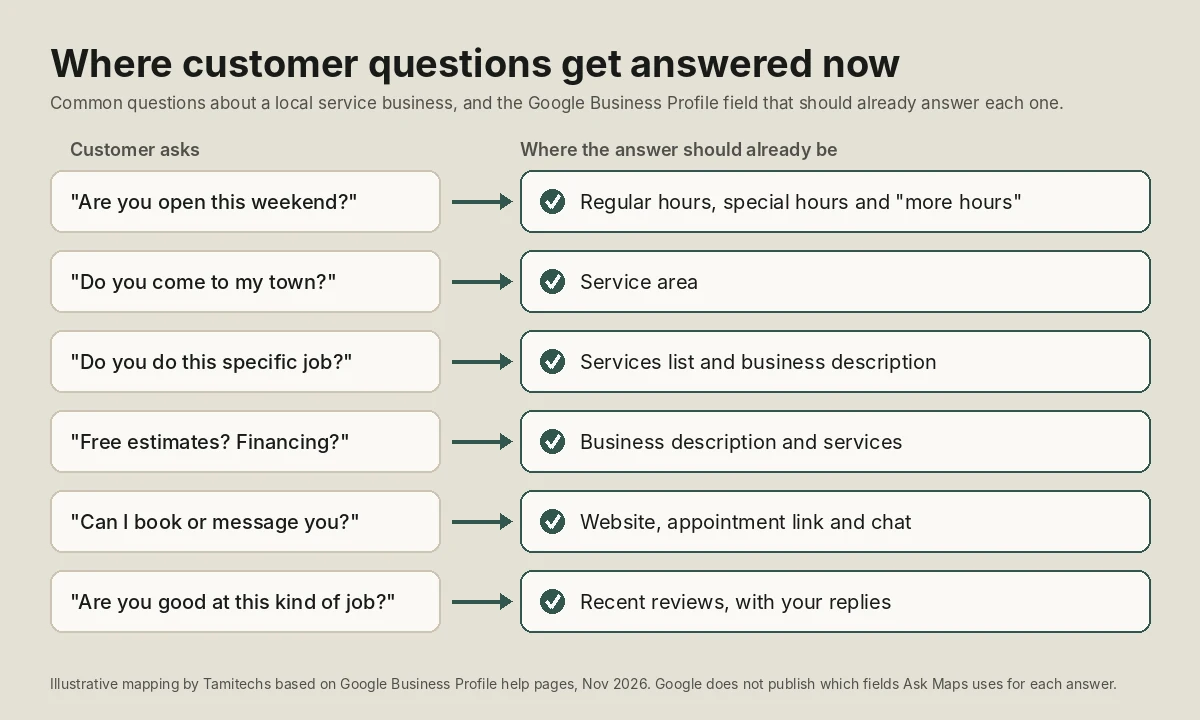
Illustrative mapping by Tamitechs based on Google's Business Profile help pages (November 2026). Google does not publish exactly which fields Ask Maps uses for each answer.
What to update this month
1. Fill in every field that applies to you
Google's local ranking help page is blunt: "Make sure your business info is as complete as possible in your Business Profile." Local results are "mainly based on relevance, distance, and popularity," and relevance "is how well a Business Profile matches what someone is searching for" (Google Business Profile Help). A long, specific question in Ask Maps is still a search. The more of your real details Google has, the more questions you can match.
Google's editing guide lists the fields owners can change, including categories (one primary and up to nine more), service area, hours (main, special and "more hours"), phone, chat, website, social links, attributes, photos and videos, business description, opening date and services (Google Business Profile Help). For a service business, the ones that answer the most questions are:
- Services. List the jobs you actually do, in the words customers use: "water heater replacement", not just "plumbing". Google says to use the services editor to keep services "along with their prices, accurate." If you don't publish prices, leave them off rather than guessing.
- Service area. Name the cities and areas you really cover. "Do you come to my town?" is one of the most common questions any service business gets.
- Special hours and more hours. Holiday hours and separate hours for emergency calls or phone support answer the "are you open now" question before it is asked.
- Attributes. Google says "Attributes tell customers more about your business." Set the ones that apply, and only those.
Google reviews edits before they go live and may call or text to confirm details, so expect a short delay (Google Business Profile Help).
2. Rewrite the business description as an answer, not a slogan
The description is the one free-text field on your profile, and it can hold up to 750 characters (Google Business Profile Help). Google's guidelines say to use it "to provide useful information on services and products offered, as well as the mission and history of your business," and not to fill it with links or focus it on promotions and prices (Google Business Profile Help).
A useful test: read your description aloud and ask whether it answers "What do you do, for whom, where, and what makes you different?" in plain sentences. A made-up example: "Family-owned HVAC company serving Miami-Dade since 2015. We repair and replace central air systems and ductless mini-splits for homes and small offices, with same-day service calls on weekdays" answers far more questions than "Your #1 trusted comfort experts!"
Don't move keywords into your business name to compensate. Google says the name should be your "real-world name" and that adding extra information to it "could result in the suspension of your Business Profile" (Google Business Profile Help). We cover the most common suspension triggers in our Google Business Profile guide for movers; the same rules apply to every service business.
3. Answer the questions already on your profile
Google said owners can still answer existing questions in the Q&A section of their Business Profile and can answer "aggregated questions" from customers (Search Engine Roundtable). Treat those questions as free research. Each one tells you what customers wanted to know and couldn't find. Answer it, then add the fact to the right profile field and to your website so the next customer doesn't have to ask.
4. Get more recent, detailed reviews, the right way
If reviews feed the answers, then the content of your reviews matters, not only the star average. A review that says "They replaced our water heater the same afternoon and explained the warranty" tells Google something specific. "Great service!" does not.
You can't script that, and you shouldn't try. Google's policy says businesses "should not require or pressure users to leave ratings or write reviews while on the premises, nor should they request that specific content be included." It also bans offering incentives and forbids businesses to "selectively solicit positive reviews from customers" (Maps User Generated Content Policy). What Google does allow is simple: ask customers to leave a review with a Google link or QR code (Google Business Profile Help).
The honest way to get detailed reviews is to ask every customer soon after the job, while the details are fresh, and to make the link easy to find. People write about what stood out to them. If your crew showed up on time, explained the work and cleaned up, those details tend to show up in reviews without prompting.
Reply to reviews, too. Google's ranking page says replying "shows that you value their feedback" and that "More reviews and positive ratings can help your business's local ranking" (Google Business Profile Help). If fake or extortion reviews are part of the picture, our guide on reporting fake Google reviews walks through what Google removes.
5. Keep your website saying the same thing
Ask Maps lives inside Google Maps, but customers also ask ChatGPT, Gemini and Google Search the same questions. If your website lists different hours, services or service areas than your profile, any AI tool that reads both has to decide which to trust. Keep the facts identical everywhere. Our article on why ChatGPT recommends your competitor explains how inconsistent details cost local businesses mentions in AI answers.
6. Consider the Gemini shortcut for profile upkeep
Google now lets owners manage a profile from the Gemini web app: update hours, contact info, attributes and action links, draft review replies, create posts and see insights such as search keywords. There are limits. It works only at gemini.google.com, with a personal Google account, and only for someone who is an owner or manager of "only one verified Business Profile on Google" (Google Business Profile Help). A single-location contractor can use it. A company with several locations or an agency managing many profiles can't, for now.
A 30-minute monthly check
Once the profile is complete, keeping it accurate takes a short monthly routine:
- Open Google Maps on your phone, in a market where Ask Maps is available, and ask it three or four questions a real customer would ask about your type of business in your area. Note whether you appear and whether the facts are right. Results are personalized, so treat this as a spot check, not a ranking report.
- Check your profile for edits you didn't make. Google combines information from "users, business owners, and other sources" (Google Maps Help), so details can change.
- Add special hours for any upcoming holidays.
- Answer any new questions waiting in your profile.
- Read the newest reviews, reply to each one, and note any question customers keep raising. If it is a fact, add it to your profile and website.
What this doesn't change
Ask Maps doesn't give anyone a way to pay for a better answer. Google says "There's no way to request or pay for a better local ranking on Google" (Google Business Profile Help). Nobody can promise you'll be the business Gemini mentions, and you should be wary of anyone who does. What you can control is whether Google has accurate, complete and recent information about you when the question comes.
That work, accurate profiles, consistent details and a steady flow of genuine reviews, is the core of our local and AI search service and our reputation management service. If you'd like a second pair of eyes on your profile before the busy season, get in touch and we'll tell you what we'd change first.