Service-Area Pages That Help (and Doorway Pages That Hurt) for Local Service Businesses
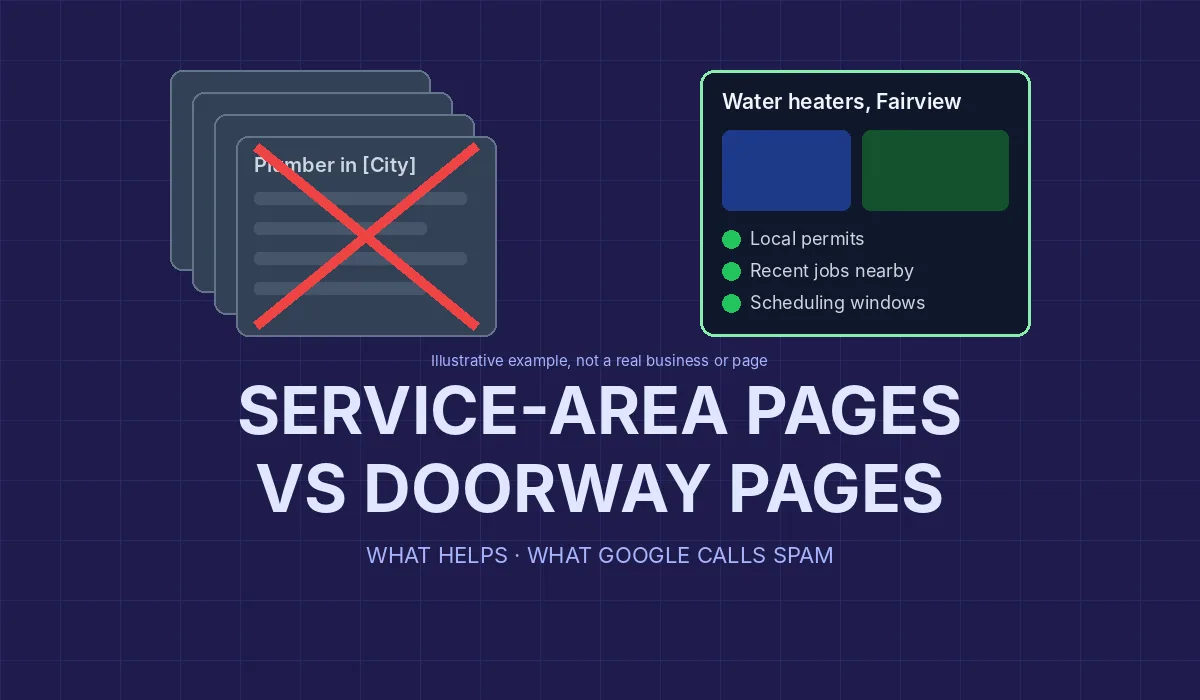
If your plumbing, HVAC, moving or cleaning company works across a metro area, someone has probably suggested building a page for every town you serve. Some of those pages bring in real customers. Others are the same paragraph with a different city name swapped in, and Google has a name for that: doorway pages.
This guide explains where Google draws the line, gives you a quick test to run on your own pages, and shows what a service-area page should contain if you want it to help both customers and your search visibility. Google's policies are quoted from its own documentation as it reads in October 2026.
What Google means by "doorway abuse"
Google's spam policies define it in one sentence: "Doorway abuse is when sites or pages are created to rank for specific, similar search queries. They lead users to intermediate pages that aren't as useful as the final destination" (Google Search Central: Spam policies for Google web search).
The examples Google lists on that page read like a description of the typical "city page" project:
- "Having multiple domain names or pages targeted at specific regions or cities that funnel users to one page"
- "Generating pages to funnel visitors into the actual usable or relevant portion of a site"
- "Creating substantially similar pages that are closer to search results than a clearly defined, browseable hierarchy"
- "Having multiple websites with slight variations to the URL and home page to maximize their reach for any specific query"
The consequences are spelled out on the same page. Google detects violations "through automated systems and, as needed, human review that can result in a manual action," and "sites that violate our policies may rank lower in results or not appear in results at all."
Notice what the policy does not say. It does not say city pages are banned. It targets pages made to rank for near-identical searches that are less useful than the page they funnel people to. A page about the town you serve can be the most useful page a customer there finds. The problem is the page that exists only because the town has a name.
Why near-identical city pages now carry more risk
There is a second policy that applies when the pages are produced in bulk. Google defines scaled content abuse as "when many pages are generated for the primary purpose of manipulating search rankings and not helping users," and says it is "typically focused on creating large amounts of unoriginal content that provides little to no value to users, no matter how it's created." Its examples include "using generative AI tools or other similar tools to generate many pages without adding value for users" (Google Search Central: Spam policies).
That matters because generating 60 town pages from a template, or asking an AI tool to "write a page for each city," now takes minutes. The speed is not the problem; the sameness is. Google's guide to its generative AI search features makes the same point from the other side: making separate pages "primarily to manipulate rankings or generative AI responses in Google Search violates" the scaled content abuse policy, and "a high quantity of pages doesn't make a website higher quality or more relevant to users" (Google Search Central: Optimizing your website for generative AI features).
Google's own self-assessment questions for content are a useful mirror here. Among its warning signs of "search engine-first" content: "Are you producing lots of content on many different topics in hopes that some of it might perform well in search results?" and "Are you using extensive automation to produce content on many topics?" (Google Search Central: Creating helpful, reliable, people-first content). Swap "topics" for "towns" and you have the classic city-page build.
The swap test: is your page a doorway?
Here is the quickest check we know, and you can run it on your own site in ten minutes. It is our rule of thumb, not a Google rule, but it lines up with the policy language above.
Open one of your city pages. Replace the town name everywhere it appears with a different town you serve. Then read the page again and ask:
- Is every sentence still true? If the page reads just as accurately for the other town, it says nothing specific about either one.
- Would a customer in that town learn anything they could not learn on your main service page? If not, the page is an "intermediate page" in Google's sense.
- Is there anything on it that only someone who has worked there could write? Real job photos, local conditions, travel times and permits are hard to fake and easy for a reader to recognize.
If a page fails all three, it is a doorway in practice, whatever you call it. If it passes, it is a service-area page doing its job.
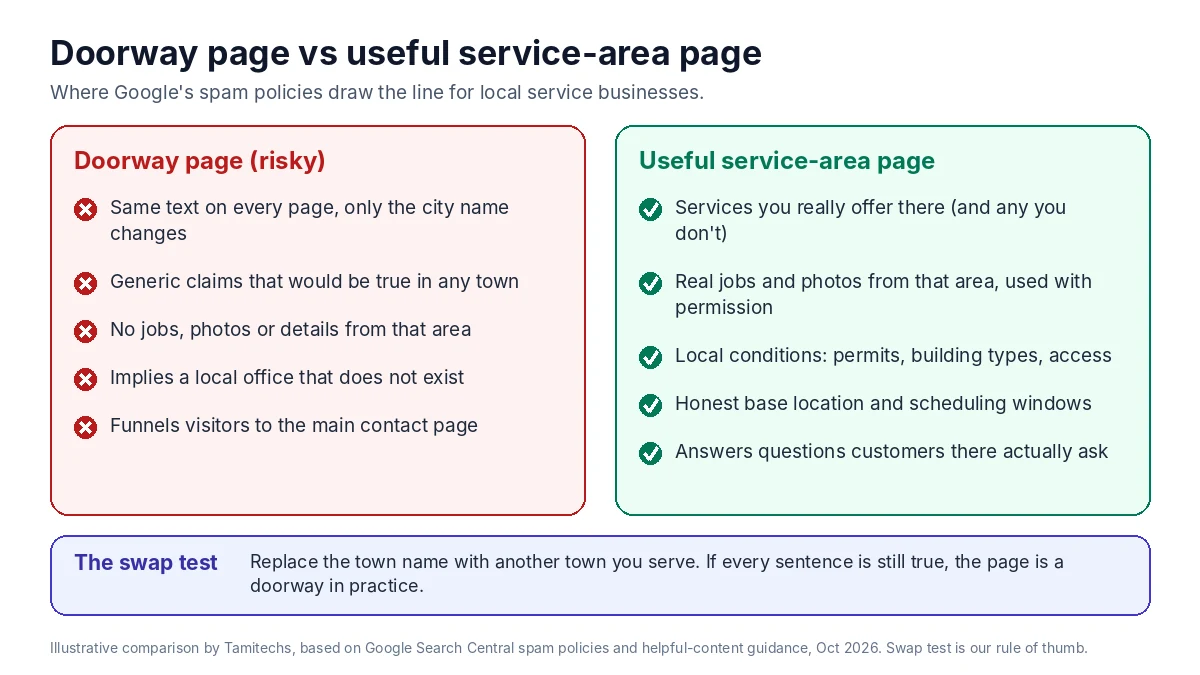
Illustrative comparison by Tamitechs, based on Google's spam policies and helpful-content guidance cited in this article (October 2026). The swap test is our rule of thumb, not a Google rule.
What a useful service-area page contains
A good service-area page answers the questions a customer in that place actually has. Not all of these will apply to your trade, and a page does not need every one. It needs enough that the swap test fails.
The services you really offer there. If you install heat pumps in one county but only service them in the next, say so. If you don't offer same-day service across the river, say that too. Specifics build trust and screen out calls you would turn down anyway.
Work you have done in that area. Photos of real jobs, a short description of a typical project, the kinds of homes or buildings you see. Only use real projects, and if you show customer photos or reviews, use ones you have permission to show. Never invent a job, a quote or a "happy customer from Springfield." The FTC's guide for small businesses is plain about this: "Advertising must be truthful and non-deceptive," and "advertisers must have evidence to back up their claims" (FTC: Advertising FAQs, a guide for small business).
Local conditions that change the job. Older housing stock, slab versus basement foundations, hard water, HOA rules, narrow streets where a moving truck cannot park, permits a particular city requires. You know these from experience; a template does not. This is exactly the kind of "unique expert or experienced take" Google's AI features guide describes as non-commodity content.
Realistic timing and logistics. Where your crew drives from, typical scheduling windows for that area, whether there is a trip charge. Keep it honest and general enough to stay true; don't promise arrival times you can't keep.
Questions customers there ask. Your call notes and estimates are the best source. If people in one suburb keep asking about a specific issue, answer it on that page.
Clear next steps. A phone number and a contact form that reach your real business, not a lead broker.
How many service-area pages should you have?
Fewer than most agencies sell. A reasonable starting point:
- One service-area hub page that lists every town, county or ZIP area you cover, with a short note on each. This is the "clearly defined, browseable hierarchy" Google's policy contrasts with doorway pages.
- Individual pages only for places where you have something distinct to say: you do a lot of work there, the conditions are different, or the services you offer differ.
- No page for a town you rarely serve. Listing it on the hub is enough.
If your business has more than one real location that customers visit, each location deserves its own page with its own address, hours and team. That is different from a city page for a place you only drive to.
Keep the website and your Google Business Profile telling the same story
Your website pages don't change who Google treats as a local business. Your Business Profile rules still apply, and the two should match.
Google's help page for service-area businesses says a service-area business is one that "visits or delivers to customers directly but doesn't serve customers at their business address." You can "set up to 20 service areas," and "the boundaries of your overall area shouldn't be more than about 2 hours of driving time from where your business is based." If you don't serve customers at your address, Google says to "remove your address and only enter your service area" (Google Business Profile Help: Manage your service areas).
Google's profile guidelines add three rules that matter for city-page projects (Google Business Profile Help: Guidelines for representing your business on Google):
- Service-area businesses "should have one profile for the central office or location with a designated service area."
- "Service-area businesses can't list a 'virtual' office unless that office is staffed during business hours," and a rented mailing address you don't operate from "isn't eligible for a Business Profile."
- "Do not create more than one page for each location of your business."
So a page for every suburb does not mean a profile for every suburb, and a city page should never imply an office you don't have. Avoid lines like "our Tampa office" or a street address on a page for a town where no one works. Say where you're based and which areas you travel to. Customers respect that, and it keeps your site consistent with your profile.
Our guide to Google Business Profile for movers covers service areas and common suspensions in more detail, and most of it applies to any service-area business.
Technical basics that support good pages
A few structural choices help search engines and visitors understand how your pages relate:
- A clean hierarchy. For example, a services section, a service-area hub, and town pages linked from the hub. Link each town page back to the relevant service pages and to the hub.
- Internal links with plain anchor text. "Water heater repair in Fairview" is fine. A footer block of 80 "plumber in [town]" links is the pattern Google's doorway examples describe.
- Structured data that matches the page. schema.org's
areaServedproperty describes "the geographic area where a service or offered item is provided" and can be used onOrganizationandServicemarkup; it replaced the olderserviceAreaproperty (schema.org: areaServed). Markup describes what is already on the page; it doesn't make a thin page useful. Google's AI features guide also notes you "don't need to create new machine readable files, AI text files, markup, or Markdown to appear in Google Search." - No fake freshness. Google's self-assessment asks, "Are you changing the date of pages to make them seem fresh when the content has not substantially changed?" Update a town page when something about your work there changes, not on a schedule.
Fixing a site that already has doorway pages
Many service businesses inherited dozens of near-identical city pages from an earlier website build. Deleting them overnight is rarely necessary. A calmer approach:
- List every location page and run the swap test on each.
- Check which ones get real visits or leads. Your analytics and Google Search Console will show which pages people actually land on.
- Rewrite the pages worth keeping with the specifics above: real work, local conditions, honest logistics.
- Merge the rest into the service-area hub, and redirect each retired URL to the page that now covers it, so old links and bookmarks still land somewhere useful.
- Remove implied offices and fake addresses everywhere they appear.
- Check the Manual actions report in Search Console. It shows whether your site has any manual actions. Doorways are listed as a common example of the "Thin content with little or no added value" action, and Google says to request a review only "when all issues listed in the report are fixed in all pages," because "fixing the issue on just some pages will not earn you a partial return to search results" (Search Console Help: Manual actions report).
Expect this to be gradual. There is no guaranteed timeline for how search results respond to cleanup, and anyone who promises one is guessing.
Where Tamitechs fits
Service-area pages sit where website structure, local SEO and your Google Business Profile meet. If your site has a pile of thin city pages, or you're planning new ones, our website development team can build a service-area structure your customers can actually use, and our SEO and AI search visibility work keeps those pages consistent with your profile and Google's policies. For movers, our moving company marketing service covers the same ground with the industry's own rules in mind. If you'd like an honest review of your current location pages, get in touch and we'll tell you which ones are worth keeping.
Sources
- Google Search Central: Spam policies for Google web search (last updated August 28, 2026)
- Google Search Central: Creating helpful, reliable, people-first content (last updated October 5, 2026)
- Google Search Central: Optimizing your website for generative AI features on Google Search (last updated July 10, 2026)
- Google Business Profile Help: Manage your service areas for service-area and hybrid businesses
- Google Business Profile Help: Guidelines for representing your business on Google
- Search Console Help: Manual actions report
- schema.org: areaServed
- FTC: Advertising FAQs, a guide for small business