Fake Google Reviews and Review Extortion: What Google Removes and How to Report It
Most service businesses get a review they disagree with sooner or later. That's normal, and the right answer is usually a calm public reply. This article is about something different: reviews from people who never hired you, a sudden run of one-star ratings in a single afternoon, or a message offering to make the reviews "go away" for a fee.
Google takes these seriously, and the scale is large. In its April 2026 update, Google said it blocked or removed more than 292 million policy-violating reviews in 2025, restricted more than 782,000 accounts and removed more than 13 million fake Business Profiles (Google: New ways we're protecting businesses on Maps). Customers care too: in BrightLocal's 2026 Local Consumer Review Survey, 97% of consumers said businesses should face consequences for fake reviews (BrightLocal: consumers want real-world consequences for fake reviews).
Even so, Google won't remove a review just because it hurts. Knowing which reviews qualify, and which reporting route to use, is what separates a report that works from one that wastes a week. This guide covers Google's rules, the three reporting routes, how appeals work, and the responses that can turn a bad week into a bigger problem. It isn't legal advice; if a review raises a legal question, talk to an attorney.
What Google will and won't remove
The starting point is one sentence on Google's own help page: "Do not report a review just because you disagree with it or dislike it." Google adds that it "doesn't get involved in conflict between businesses and customers" (Google Business Profile Help: Report inappropriate reviews). A real customer saying your crew arrived late, or that your price was too high, is not a policy violation, even if you remember the job differently.
What Google does remove is content that breaks its Maps prohibited and restricted content policy. The categories that come up most often for service businesses are:
- Fake engagement. Google's policy says posts must reflect real experiences and that "fake engagement is not allowed and will be removed." Reviews posted from multiple accounts or paid for fall here.
- Rating manipulation. Google defines this as "any attempt to directly or indirectly influence the star rating of a place on the map through fake and misleading content," including "orchestrating coordinated campaigns to unfairly inflate or deflate a place's rating" (Google: Rating manipulation). A burst of one-star reviews from accounts with no history is the classic pattern.
- Conflict of interest. Reviews "biased by a personal or professional conflict of interest" are not allowed (Google: Incentivized or biased reviews). A competitor reviewing you, or a former employee posting as a "customer," fits here.
- Off-topic content. Reviews must be based on an experience at that location. A review that is clearly about a different company, or about a news story rather than a job, can qualify.
- Harassment, personal information and offensive content. Threats, posting someone's private details without consent, hate speech and profanity used to offend are all prohibited. The offensive content category also lists "unsubstantiated allegations of unethical behavior or criminal wrongdoing."
That last line is worth reading carefully. It doesn't mean every harsh accusation comes down, but a review that accuses your technician of theft with no detail at all is a different thing from a review that says the job took longer than quoted.
Three reporting routes, and which one to use
Google now has separate routes for different problems, and using the wrong one slows everything down.
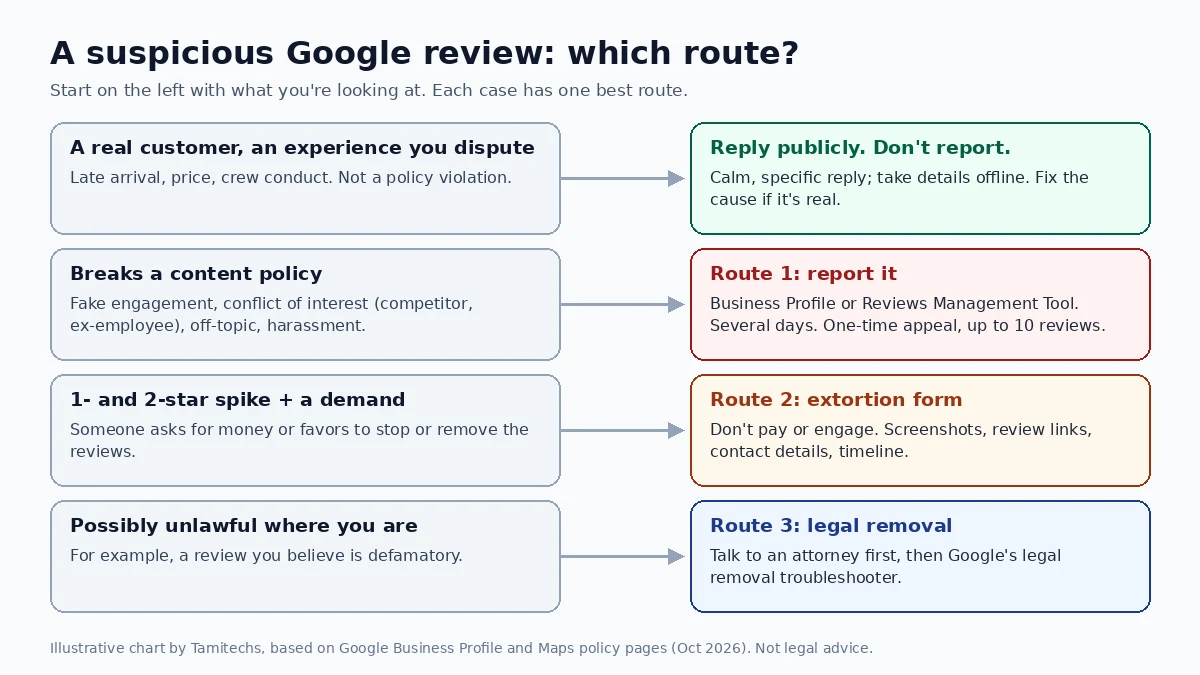
Illustrative routing chart by Tamitechs, based on the Google Business Profile and Maps policy pages cited in this article. Google's processes change; check the current help pages before relying on a detail.
Route 1: A review that breaks a content policy
This covers most fake reviews. You can report from your Business Profile: open your reviews, select the report option next to the review, pick a reason and send the report. Or use Google's Reviews Management Tool, choose "Report a new review for removal," select the review and submit a reason (Google: Report inappropriate reviews).
Google says evaluation "typically takes several days," and you can track it in the Reviews Management Tool. The status will show as decision pending, then either removed or "Report reviewed - no policy violation."
A few habits make these reports more effective:
- Pick the most accurate reason. "Conflict of interest" for a competitor, "off-topic" for a review about a different business. A precise reason is easier to evaluate than a general complaint.
- Check your records first. Search your CRM, job schedule and invoices for the reviewer's name, the date and the service described. "We have no record of this person" is the core of most fake-review cases, and you'll need it again if you appeal.
- Report the reviewer's profile if the pattern is in the account. In Google Maps, you can tap the reviewer's name and report the user profile itself, which helps when one account has posted a string of similar reviews.
Route 2: Review extortion
Review extortion follows a recognizable pattern. Google describes the warning signs as "a sudden increase in 1-star and 2-star reviews on your Google Business Profile," followed by a demand for payment or favors to stop or remove them (Google: Report negative review extortion scams).
Google's advice starts with what not to do: "Do not engage with or pay the malicious individuals." Then it points you to a dedicated merchant extortion report form, which asks for your contact details and relationship to the business, a link to the affected profile, details of the suspicious reviews, and details of how the extortion attempt reached you.
Before you file, gather:
- Clear screenshots of every message from the third party, with dates, times and sender details visible.
- Direct links to each review you believe is part of the attempt.
- Any names, usernames, email addresses, phone numbers or social profiles the person used.
- A short timeline: when the reviews started and when the demand arrived.
Google says this channel is "exclusively for cases where you've been directly subjected to an extortion attempt." Ordinary fake reviews without a demand go through Route 1. Google also says it investigates and notifies you of the result, but won't share investigation details for privacy and security reasons.
There's some good news here. In April 2026, Google said its systems now detect scam patterns such as "attempts to demand payment in exchange for removing fake one-star reviews" and can stop those posts before they go live. When it sees a sudden spike in spam reviews, Google says it will remove the fake content, pause new reviews on the profile, alert the owner and show customers a banner explaining why reviews are paused (Google: New ways we're protecting businesses on Maps). Google described this as rolling out globally, so you may see a pause before you've filed anything. Report anyway if you received a demand.
Route 3: A review you believe is unlawful
Some reviews don't clearly break a content policy but may break the law where you operate, such as a review you believe is defamatory. Google's policy pages point to a separate legal removal troubleshooter for content that may violate local law (Google: Legal removals).
This is the route to take with a lawyer, not on a hunch. Defamation is a legal question with its own standards, and a factual dispute about a job is rarely defamation. Other platforms work the same way: Yelp, for example, says it "doesn't take sides in factual disputes" and asks businesses to contact support with a final court order if a court has found a review defamatory (Yelp: Will Yelp remove a false or defamatory review?).
When Google says no: the one-time appeal
If Google finds no violation, you get one more chance. From the Reviews Management Tool, choose the option to check reviews you reported earlier, select the eligible reviews and submit an appeal. Google calls this "a one-time appeal," and you can include up to 10 reviews in one appeal submission. The status then changes to "Escalated - check your email for updates," and the final decision arrives by email (Google: Report inappropriate reviews).
Because you only get one appeal per review, treat it as your best case, not a retry. Add what the first report lacked: the specific policy the review breaks, the fact that the reviewer doesn't match any job in your records, and the pattern if it's one of several reviews posted close together. Keep it factual and short. An angry appeal reads like the "I disagree with this review" report Google tells you not to file.
If the appeal fails, the review stays. At that point, your reply is your best tool. Customers read replies, and a calm, specific response often does more for your reputation than the review does against it. Our guide on how moving companies should respond to negative reviews has reply templates that work for any service business.
What not to do
The pressure of a fake-review attack pushes some owners toward moves that make things worse. Avoid these:
Don't pay anyone who offers to remove reviews in exchange for money. That's the extortion pattern Google describes, and paying invites a repeat. Report it instead.
Don't fight fake negatives with fake positives. Google can restrict profiles involved in fake reviews or rating manipulation. Its restrictions page says a profile may be blocked from getting new reviews for a set period, may have existing reviews unpublished, and may "display a warning to let consumers know that fake reviews were removed" (Google: Business Profile restrictions for policy violations). A warning banner on your own profile costs far more than a few bad reviews. In the United States, the FTC's rule on consumer reviews, in effect since October 21, 2024, also makes it illegal to write, create or sell fake consumer reviews, and courts can impose civil penalties for knowing violations (FTC: Consumer Reviews and Testimonials Rule Q&A).
Don't threaten or accuse the reviewer. The same FTC rule bars businesses from using an "unfounded or groundless legal threat," physical threats or intimidation to get a review removed, and from making a false accusation about a reviewer when you know it's false. If you believe a review is fake, say so to Google through the reporting tools, not in a public reply that calls the reviewer a liar.
Don't report every negative review. Mass-reporting genuine reviews wastes your one appeal on cases you can't win and buries the reviews that really are fake. Report what breaks the rules and reply to the rest.
Don't go quiet. While a report is pending, a short, neutral reply such as "We can't find any record of this job. Please contact us at [number] so we can look into it" shows customers you're paying attention without accusing anyone.
A one-page response plan
When a suspicious review shows up, work through this in order:
- Screenshot it with the date, star rating and reviewer name, before anything changes.
- Check your records for the name, date and service described.
- Decide the route: a real customer you disagree with (reply, don't report), a policy violation (Route 1), a demand for money (Route 2) or a possible legal issue (Route 3, with an attorney).
- File the report with the most accurate reason and keep a note of when you filed it.
- Post a neutral public reply while the report is pending.
- Watch the status in the Reviews Management Tool. If it comes back as "no policy violation," use the one-time appeal with your strongest evidence.
- Keep collecting genuine reviews from real customers, within Google's rules. A steady flow of honest reviews is what makes a few bad ones matter less. Our guide to getting more Google reviews without breaking Google or FTC rules covers how.
None of this guarantees a removal. Google makes the final call, and some reviews you're sure are unfair will stay up. What a clean, well-documented report does is give Google everything it needs to act on the reviews that really do break its rules.
Where Tamitechs fits
Fake reviews and extortion attempts are stressful, especially when your phone is supposed to be ringing with new jobs. Our reputation management team helps service businesses document and report reviews that break platform rules, handle appeals and keep honest reviews coming in. We also run marketing for moving companies and broader SEO and AI search visibility work. If your profile is under attack, tell us what's happening and we'll start with an honest look at which reviews can be reported and which are better answered.
Sources
- Google: New ways we're protecting businesses on Maps (April 16, 2026)
- Google Business Profile Help: Report inappropriate reviews on your Business Profile
- Google Business Profile Help: Report negative review extortion scams
- Google Business Profile Help: Business Profile restrictions for policy violations
- Google Maps: Prohibited and restricted content
- Google Maps: Rating manipulation
- Google Maps: Incentivized or biased reviews
- Google Maps: Report or fix content
- Google Maps: Legal removals
- FTC: Consumer Reviews and Testimonials Rule, Questions and Answers
- BrightLocal: Consumers want real-world consequences for fake reviews (2026)
- Yelp Support: Will Yelp remove a false or defamatory review?