Apple Business and Bing Places for Service Businesses: The Listings Outside Google
Most service business owners have spent real time on their Google Business Profile. Far fewer have ever logged in to Apple's or Microsoft's version, and many don't know they exist. That gap used to be easy to ignore. It is getting harder to justify.
BrightLocal's Local Consumer Review Survey 2026, based on a panel of 1,002 US adults, found that the share of consumers who use Apple Maps to read reviews nearly doubled in a year, from 14% to 27%, while Google's share fell from 83% to 71%. The same survey found 45% of consumers had used ChatGPT or other AI tools for local recommendations, up from 6%. Google is still the biggest source by far. But the customer who asks Siri for a plumber, taps a pin in Apple Maps or reads an answer built from someone else's directory data never sees your Google profile at all.
This guide covers the two listings that matter most outside Google for service businesses such as movers, HVAC companies, plumbers, roofers and cleaners: Apple Business (the new name for Apple Business Connect) and Bing Places for Business. Both are free. Together they take about an afternoon.
First, the name change: Apple Business Connect is now Apple Business
If you search for "Apple Business Connect," you will find a lot of guides that are now out of date. In March 2026 Apple announced Apple Business, a free platform that combines Business Connect with Apple Business Manager and Apple Business Essentials. It launched on April 14, 2026. Apple said Business Connect "will no longer be available once Apple Business launches" and that existing claimed locations and place card details would migrate automatically. Apple's own Business Connect user guide now opens with a notice that "Apple Business Connect is now Apple Business."
So if someone at your company claimed your Apple Maps listing back in 2023, it should still be there, just under a new login screen. If nobody did, start at Apple Business.
What each listing controls
Here is the short version of what you are signing up for, based on each company's own documentation.
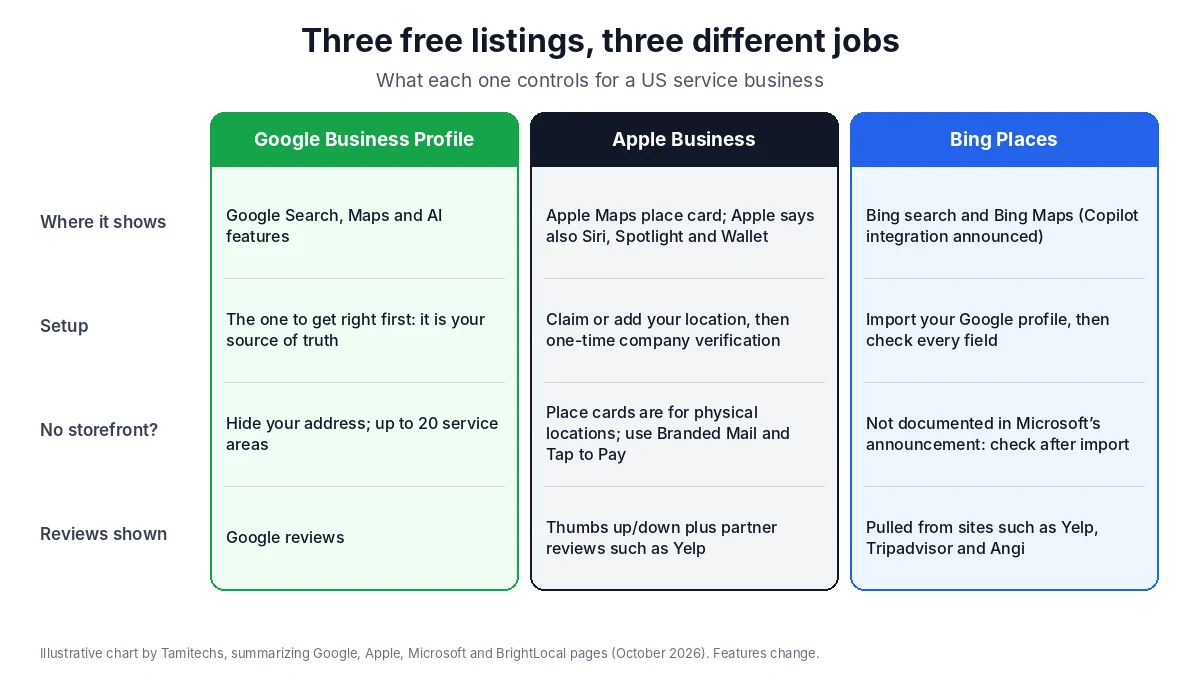
Illustrative chart by Tamitechs, summarizing the Google, Apple, Microsoft and BrightLocal pages cited in this article. Features change; check each dashboard before you rely on a detail.
Apple Business
Apple Business manages your place card, the panel people see when they tap your business in Apple Maps. Apple's Business Connect support page says the details you set "can appear in Siri, Spotlight, and Wallet" as well as Maps. On the place card you can control:
- Display name, address, hours, phone number and website. Apple's location attributes guide says the display name "needs to match the name on the storefront or website," hours should match the hours on your official website, and the website can't be a third-party site (a Facebook, Instagram or TikTok page is accepted).
- One primary category and up to four more.
- Photos, a logo and a cover photo, which Apple reviews before they go live.
- Showcases (a promotion or update shown on the place card) and Actions (buttons such as booking or getting a quote).
Apple's Grow page claims that claimed businesses "get 30 percent more views" and that custom action buttons "increase your clickthrough rate by 31 percent." Those are Apple's own figures, and Apple doesn't publish how it measured them, so treat them as a direction rather than a promise.
Apple Business also includes Ads on Maps. Apple's ads help page says it is available in the United States and Canada, only to advertisers with verified business locations there, and that some organizations get a one-time $150 sign-up credit. Get the free listing right first; ads on top of a thin place card waste money.
Bing Places for Business
Bing Places controls how your business appears in Bing search results and Bing Maps. In October 2025 Microsoft rebuilt the tool and moved it from bingplaces.com to bing.com/forbusiness. Microsoft says it improved "how business owners import listings from Google," keeping names, hours and contact details intact, and lists "deeper integrations with Bing Maps and Copilot" as coming next. Trade coverage from PPC Land reports that a Google Business Profile import comes with instant verification.
For a busy owner, that import is the main reason to do this today. If your Google profile is accurate, Bing can be close to a ten-minute job.
The catch for service-area businesses
This is where movers, plumbers and other trades that go to the customer need to slow down.
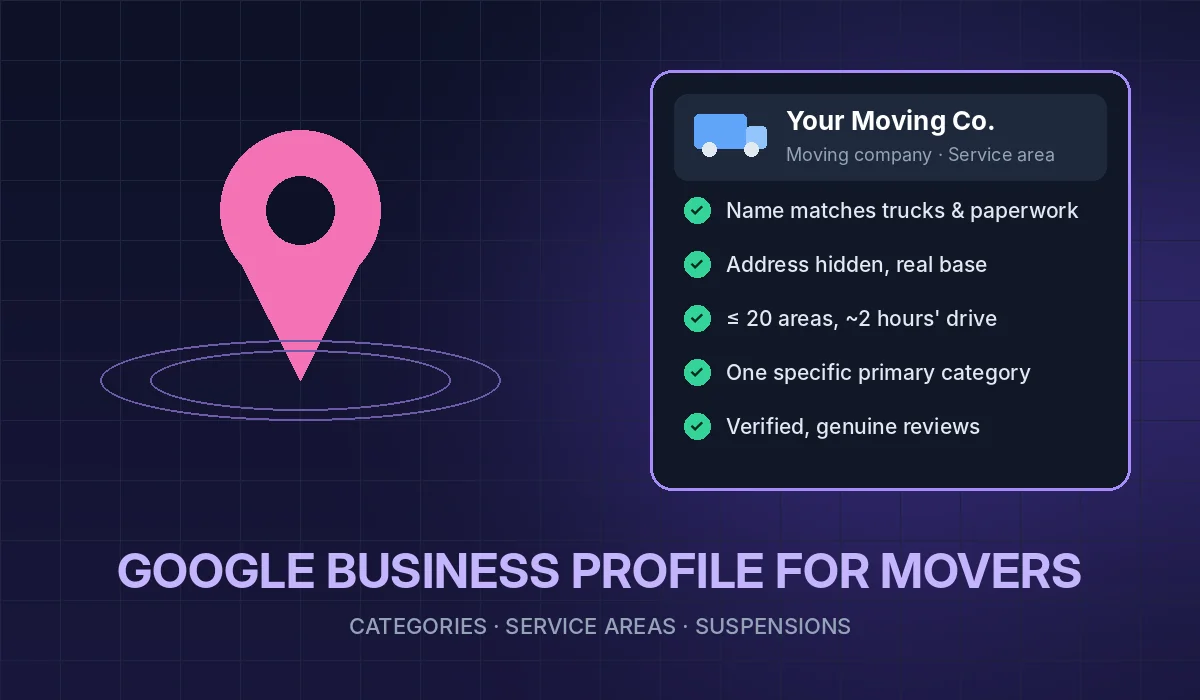
Google has a clear rule for you. Its service area help page says: "If you don't serve customers at your business address, remove your address from your Business Profile." You can list up to 20 service areas, and the overall area shouldn't extend more than about two hours of driving from where you're based.
Apple describes place cards as being for physical locations. Its Grow page says to create a place card for each physical location, and its support page says online businesses, service-area businesses and home-based businesses can use Branded Mail and Tap to Pay on iPhone. Apple's help pages we reviewed don't describe a hidden-address option like Google's. In practice, that means:
- If you have a real office, warehouse or yard where you can meet customers or where staff work during posted hours, claim that location in Apple Business and keep it accurate.
- If you work from home and don't want your address on a map, don't invent a storefront or rent a virtual office to get a pin. Google treats that as a guideline violation (see our guide to Google Business Profile suspensions for movers), and it gives customers a false address. Use Apple's brand features instead (more below) and make sure your website and Google profile are strong, because those feed the answers Apple users get elsewhere.
Bing's announcement doesn't say how it handles service-area businesses. If you import from Google, check the result before you publish: confirm that a hidden address stayed hidden and that the service areas carried over the way you expect.
Where the reviews come from
Neither Apple Maps nor Bing works like Google reviews, and this changes where you should put your effort.
According to BrightLocal's guide to Apple, Bing and Nextdoor reviews (updated October 2025), Apple Maps shows ratings that are "primarily pulled from a range of other places, such as Yelp," alongside Apple users' own thumbs-up or thumbs-down ratings and photos. Bing pulls reviews from sites including Yelp, Tripadvisor, Foursquare and Angi.
Two practical takeaways:
- Your Yelp profile shows up in more places than Yelp. If your Yelp listing is unclaimed, has old hours or a dead phone number, that information can follow you into Apple Maps and Bing. Claim it and fix the basics.
- Don't run a review campaign on Yelp the way you would on Google. BrightLocal's summary of review platform guidelines quotes Yelp: "Proactively asking for reviews may hurt your Yelp rating." Yelp's software filters reviews it thinks were requested into a "not recommended" section that doesn't count toward your rating. Keep your review requests on Google, keep them honest, and let Yelp collect what it collects.
If you want the Google side done properly, our guide to getting more Google reviews without breaking Google or FTC rules walks through it.
Why this matters for AI answers too
A lot of advice online says "Apple feeds ChatGPT" or "Bing powers every AI tool." Be careful with claims like that. Here is what the companies actually say:
- Google says in its guide to optimizing for generative AI features (updated July 2026) that Google Business Profiles "can help your products and services to be visible" in AI responses.
- OpenAI says in its ChatGPT search help article that ChatGPT "sometimes partners with other search providers" and may use trusted third-party providers for "nearby business listings." It doesn't publish which directories those are.
- Microsoft says Copilot integration with Bing Places is coming, not that it's finished.
Nobody outside these companies can tell you exactly which listing an AI answer read. That is the real argument for doing all three: when your name, phone number, hours and services say the same thing on Google, Apple, Bing, Yelp and your own website, it doesn't matter which one an assistant checks. When they disagree, you're betting on the assistant picking the right one. Our diagnostic, Why ChatGPT Recommends Your Competitor, covers the other checks.
A one-afternoon setup plan
Do these in order. Have your Google Business Profile open in another tab as the "source of truth," and fix it first if anything on it is wrong.
1. Apple Business (about 30–60 minutes, plus Apple's review time)
- Sign in at Apple Business with an Apple Account you use for the business (not a technician's personal account). Apple's support page says you complete a one-time company verification.
- If you have a qualifying physical location, search for it in Maps first; claim it if it exists, add it if it doesn't.
- Use your real business name exactly as it appears on your website and signage. No keywords, no city names, no ® or ™ symbols.
- Match hours and phone number to your Google profile. Phone numbers need the country code.
- Pick a primary category that describes the core service, then up to four more.
- Add a logo, a cover photo and real photos of your trucks, team and work. Apple reviews photos, so skip stock images.
- Add an Action that goes to a real booking or quote page on your own site.
- Turn on Branded Mail if you send estimates or invoices from your own domain. Your name and logo will show in Apple's Mail app, which helps customers trust that the estimate is really from you.
2. Bing Places (about 10–20 minutes)
- Go to Bing Places for Business on bing.com/forbusiness and choose the Google import.
- Before publishing, compare every field with your Google profile: name, address visibility, service areas, phone, hours, categories and website.
- Add photos if they didn't import.
3. Yelp check (about 15 minutes)
- Claim your Yelp page if you haven't, and correct hours, phone, website and service area. Don't ask customers for Yelp reviews.
4. Your website (ongoing)
- Put the same name, phone number and hours in your site footer and on your contact page, and list the towns you serve in plain text. If your site can't do that cleanly, that's a website problem, not a listings problem.
5. Set a reminder
- Every time you change hours, phone numbers or holiday schedules on Google, change them on Apple, Bing and Yelp the same day.
What not to bother with
- Buying a "listings sync" tool before you've done the basics. For a single-location business, the manual setup above is quick and free. A paid tool can make sense for many locations, but it won't fix a wrong name or fake address upstream.
- Keyword-stuffed names. "Best Miami Movers Cheap Local Moving" will not help on Apple or Bing, and Apple's own guide says the name has to match your storefront or website.
- Apple Maps ads before the listing is complete. Ads send people to your place card. Make the place card worth landing on first.
- Chasing every directory on the internet. Get Google, Apple, Bing, Yelp and your website consistent first. Directories that matter in your trade come next; bulk citation lists rarely earn their cost.
The bottom line
Apple Business and Bing Places won't replace your Google Business Profile, and nobody can promise they'll get you named in an AI answer. What they do is close two gaps: the growing number of iPhone users who check Apple Maps, and the AI and search tools that read directory data you can't see. For most service businesses it's an afternoon of work and no ongoing cost.
If you'd rather have someone handle it, from listings and reviews to the SEO and AI visibility work behind them, our team does this for moving companies and other service businesses across the US. Tell us about your business and we'll start with an honest check of where you show up today.