Google Business Profile for Movers: Categories, Service Areas and Common Suspensions
For a local or regional mover, the Google Business Profile is often the first thing a customer sees: the name, the star rating, the phone button and the map pin, all before anyone clicks through to your website. It is also one of the easiest assets to lose. A profile that breaks Google's rules can be suspended, and while it is down, the public cannot see it at all.
Moving is a tough category for this. Many movers work from a yard or warehouse that customers never visit, run crews across several counties, and compete against lead sellers and brokers that look a lot like movers in search results. Each of those facts touches a specific Google rule. This guide walks through the parts of the profile that matter most for movers, what Google's own help pages say about each, and how to fix a profile that has already been suspended.
First, decide what kind of business you are on Google
Google sorts businesses into three types, and the right one decides almost every other setting.
- Service-area business. You go to the customer and do not serve customers at your address. Google's guidelines for representing your business say plainly: "If you're a service-area business, you should hide your business address from customers."
- Hybrid business. Google's help page on managing service areas defines this as a business that "serves customers at its business address but also directly visits or delivers to them." A hybrid can show its address and a service area.
- Storefront. Customers come to you, and there is no service area.
Most movers are service-area businesses. The truck goes to the customer's home, and nobody walks into the yard to book a move. If you run a storage facility or a staffed office where customers do come during set hours, a hybrid setup can be honest. Google's guidelines add a detail for that case: storage facilities should list office hours as regular hours, and front gate hours only if there are no office hours.
What you cannot do is pick "storefront" because it looks bigger. The service-area page says a business without permanent on-site signage "is not eligible as a storefront" and should be set up as a service-area business.
The address: where most mover profiles go wrong
Google needs a real place where your business operates, even when it hides that address from the public. The guidelines rule out the shortcuts that tempt movers who want to look local in a city where they have no office:
- "P.O. boxes or mailboxes located at remote locations aren't acceptable."
- A virtual office, meaning a rented mailing address where you do not actually operate, is not eligible.
- A co-working space only qualifies if it has clear signage, receives customers during business hours, and is staffed by your own team during those hours.
That rules out a common pattern: renting a mailbox in each suburb you serve and creating a profile for each one. The guidelines and the service-area page both say a service-area business gets one profile for the whole area it serves. Google does allow separate profiles where a business has genuinely separate locations, each with its own staff and service area. If you run a real second depot with its own crews, it can have its own profile. If it is a mailbox, it cannot.
Service areas: 20 entries and about two hours of driving
Once the address is hidden, the service area is what tells Google where you work. The service-area help page sets three limits worth knowing before you start typing:
- No radius. "You can't set your service area as a radius distance around your business." You list areas by city, postal code or another type of area instead.
- Twenty at most. "You can have up to 20 service areas."
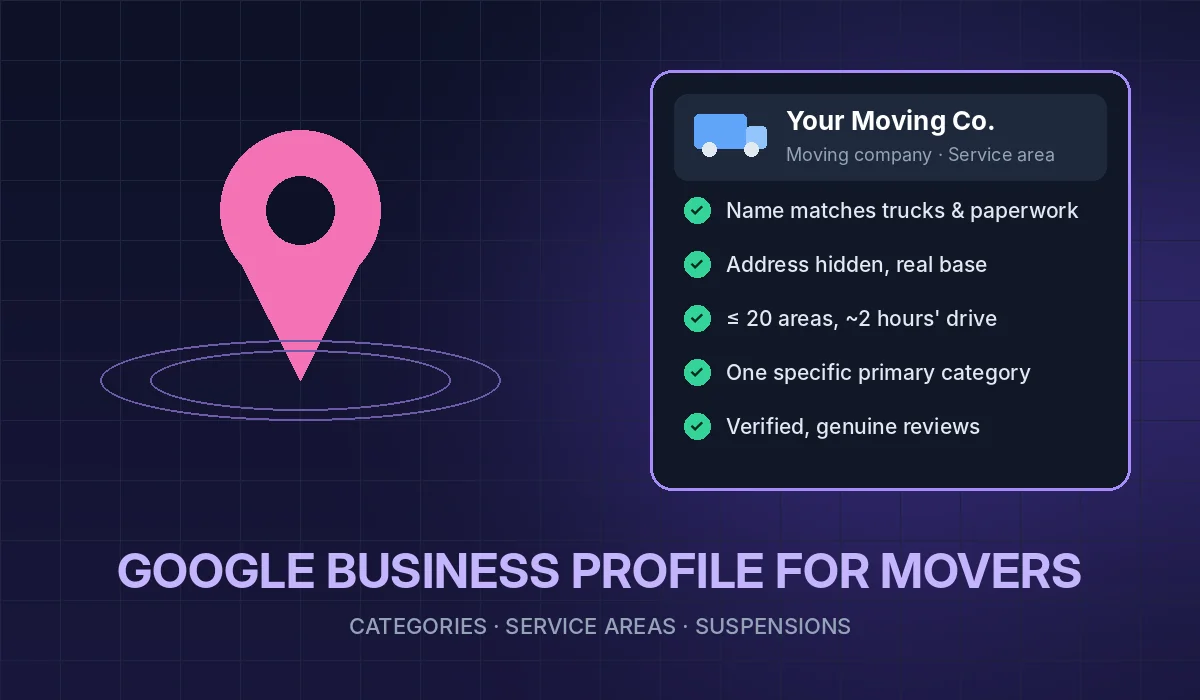
- About two hours of driving. "The boundaries of your overall area shouldn't be more than about 2 hours of driving time from where your business is based." The guidelines add that larger service areas may be appropriate for some businesses, but treat two hours as the default.
For a long-distance or interstate mover, this feels limiting. You may move families from Miami to Chicago, but your profile's service area should reflect where your crews start jobs, not every state you deliver to. The place to show long-distance work is your website: route pages, a clear explanation of how your interstate moves work, and your registration details. Your profile's job is to get you found by people near your base.
Choose the 20 entries on purpose: the areas where you actually want jobs and where your reviews come from.
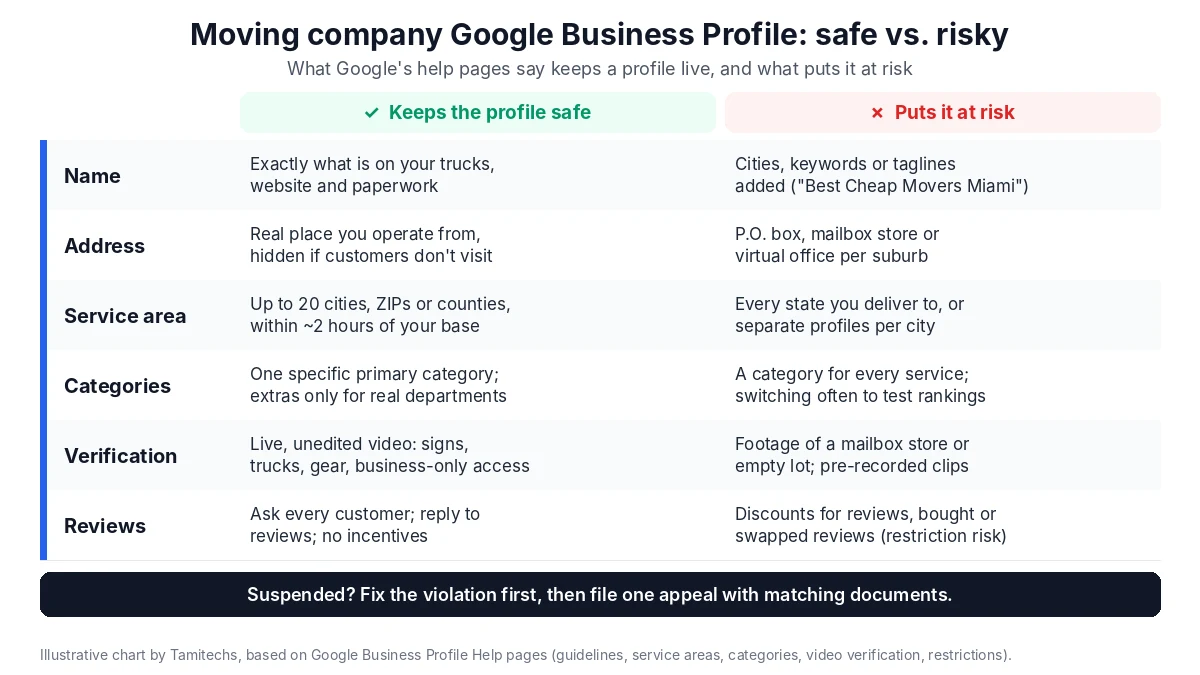
Illustrative chart by Tamitechs, summarizing the Google Business Profile help pages cited in this article. Google does not publish a full list of suspension triggers.
The business name: no keywords, no cities
Of all the rules, this is the one movers break most casually. The guidelines say your name on Google should match the name you use in the real world, on your trucks, signage, website and paperwork. Adding extra information is not allowed and "could result in the suspension of your Business Profile." The list of things you cannot add includes marketing taglines, phone numbers, URLs, service descriptions and location details.
So "Sunrise Moving" is fine. "Sunrise Moving - Best Cheap Movers Miami Long Distance" is not, even if you see competitors doing it. Under Google's own wording, that kind of name puts the whole profile at risk of suspension.
If your legal name really does include a service word, you are using the real name, so it is fine. If you want a keyword in your name, the honest route is to rebrand and change your trucks, website and paperwork too. A name used only on Google is not the real name.
Movers have one more reason to keep names consistent. Federal rules for interstate household goods carriers require every advertisement to show your name or trade name as it appears on the document assigning your U.S. DOT number, and the number itself in the form "U.S. DOT No." followed by the number (49 CFR 375.207). Household goods brokers have their own display rules, including stating that they do not transport shipments themselves (49 CFR 371.107). Whether your profile itself counts as an advertisement is a question for your compliance adviser, but your website and other ads should use the same name customers see on Google. When the name on the profile, the website and the DOT record all match, both customers and search systems have an easier time trusting you.
Categories: fewer and more specific
Your primary category is the strongest signal you give Google about what you are. Google's category help page says to "Select a primary category that best describes your business," and to use additional categories only for real departments or services. It also says, "Do not select a category for every product or service," and the guidelines add that you should "Use as few categories as possible to describe your overall core business."
Two tests from Google make this practical:
- Most specific wins. Google's example is choosing "Nail salon" rather than "Salon." For a mover, search the category list for the most specific option that matches your main business, rather than a broad transport or logistics category.
- "This business IS a," not "HAS a." The guidelines tell you to pick categories that complete the phrase "This business IS a," rather than "this business HAS a." If you sell boxes as a side line, you are not a packaging supply store. If you run a genuine self-storage facility that customers rent and visit, a storage category can be honest as an additional category.
You also cannot invent a category ("You can't create your own category"), and if a specific option is missing, Google says to pick a general one that still describes the business.
One practical warning: changing categories can trigger another verification. The category page says, "If you add or edit an existing category, you might be asked to verify your business again." Do not keep switching categories to test rankings. Make one well-reasoned choice and leave it.
Verification: what movers should be ready to film
Verification is how Google confirms you are a real business at a real place, and as noted above, some edits can trigger it again. One method Google may offer is a video, and its video verification page is specific about what it wants to see. For a service-area business, the video should show:
- Location: "record street signs, nearby landmarks, or other identifiers at your business address." Avoid "empty land or locations without clear markers."
- Proof the business exists: the tools, equipment or products you use. For a mover, that is the branded truck, dollies, pads and wrap, and staff in branded uniforms.
- Proof of management: "Record yourself performing a service or accessing business-only assets," such as unlocking the warehouse or the truck. A business permit, invoice or utility bill can also help.
The video must be recorded live, with no pre-recorded footage, at least 30 seconds long and unedited. If you work from home, Google says to record landmarks and signs in your immediate neighborhood. Plan the route before you hit record so you are not hunting for a street sign at second 25. And keep tax numbers, bank details and ID numbers out of frame.
This is also where fake addresses fall apart. A mailbox store cannot produce a video of your trucks parked at it.
Reviews: the fastest way to get restricted
Reviews are a ranking factor. Google's local ranking page lists responding to reviews as a way to improve local ranking, and says prominence ("how well-known a business is") is one of the three main factors, along with relevance and distance. That makes reviews worth earning properly, and a disaster to fake.
Google's help page on getting reviews says reviews "must reflect a genuine experience," and that offering incentives such as discounts in exchange for reviews "is considered fake & misleading content and is strictly prohibited." When Google finds a fake engagement problem, its page on profile restrictions lists what can happen beyond removing the fake reviews:
- The profile "will not be able to receive new reviews or ratings for set period of time."
- Existing reviews or ratings "will be unpublished for set period of time."
- The profile "will display a warning to let consumers know that fake reviews were removed."
For a mover, a public warning on the profile is worse than a slow month of reviews. Customers are already wary of moving scams, and a fake-review notice confirms their fears. Our guide to getting more Google reviews for a moving company covers how to ask every customer at the right moment without incentives or filtering. If you want help with the wider picture, including how you handle complaints, see our reputation management service.
If your profile is suspended
Google's suspension help page says it "may suspend or disable Business Profiles that don't follow our guidelines," and that while a profile is removed, "The public can't go to the profile." Google does not publish a list of exact triggers, so start by comparing your profile to every section above: name, address, service area, categories and reviews.
Then fix the problem before you appeal. The appeal process works like this:
- Correct the violation. Remove keywords from the name, hide a storefront address you should not be showing, cut the service area back, and remove extra categories.
- Gather proof. Google lists official business registration, a business license, tax certificates and utility bills (electricity, phone, water or internet) as supporting documents, and says to "check that the business name and address match the profile." A mover's operating authority and DOT registration records are worth having ready alongside these, as long as the name matches.
- File one strong appeal. Use Google's appeals tool, select the profile and the decision, attach the documents and submit. The page is blunt: "Appeals can only be submitted once." Google says a further review may be possible only if the appeal is denied.
- Do not start over. "Do not create a new Business Profile for the same business." Google also notes that if your account itself is restricted, you won't be able to create or claim other profiles.
Google does not give a timeline for appeal decisions. It says only that it will review the appeal and send an email with the decision. Plan for the profile to be down for a while, and make sure your website, your phone line and your other review profiles can carry the load in the meantime.
A 30-minute audit you can run this week
Open your profile and check each line:
- Type: Do customers come to your address during set hours? If not, is the address hidden?
- Address: Is it a real place where you operate, not a mailbox or virtual office?
- Service area: 20 entries or fewer, within about two hours of your base, and all places you actually serve?
- Name: Exactly what is on your trucks and paperwork, with no cities or keywords?
- Categories: A specific primary category, and additional ones only for real departments?
- Hours: Real office hours, or office hours for a storage facility?
- Reviews: No incentives, no review swaps, no purchased reviews, and replies to recent reviews?
- Website match: Does your website use the same name, phone number and service area, and show your U.S. DOT number where the rules require it?
If everything passes, the next step is visibility, not cleanup. Profile accuracy feeds Google Maps directly, and it also matters for AI assistants that pull local business information. We cover that in how moving companies get recommended by ChatGPT, Google and Perplexity.
Where Tamitechs fits
A clean, verified profile is the base layer of local marketing for movers. Our moving company marketing service covers profile audits and fixes, and our SEO service handles the website side. No one can promise a top spot on Google Maps, and Google itself says there is no way to pay for a better local ranking. What we can do is make sure nothing on your profile is holding you back.
If your profile is suspended, or you are not sure it would survive a re-verification, get in touch and we will go through it with you.
Sources
- Google Business Profile Help: Guidelines for representing your business on Google
- Google Business Profile Help: Manage your service areas for service-area and hybrid businesses
- Google Business Profile Help: Choose a business category
- Google Business Profile Help: Verify your business with video
- Google Business Profile Help: How to improve your local ranking on Google
- Google Business Profile Help: Tips to get more reviews
- Google Business Profile Help: Business Profile restrictions for policy violations
- Google Business Profile Help: Fix suspended or disabled profiles
- 49 CFR 375.207: What items must be in my advertisements? (J. J. Keller RegSense)
- 49 CFR 371.107: Household goods broker advertising (Cornell LII)
Written by Ava Davis for Tamitechs.