Google Local Services Ads for Home Service Businesses: Screening, the Google Verified Badge and Lead Quality
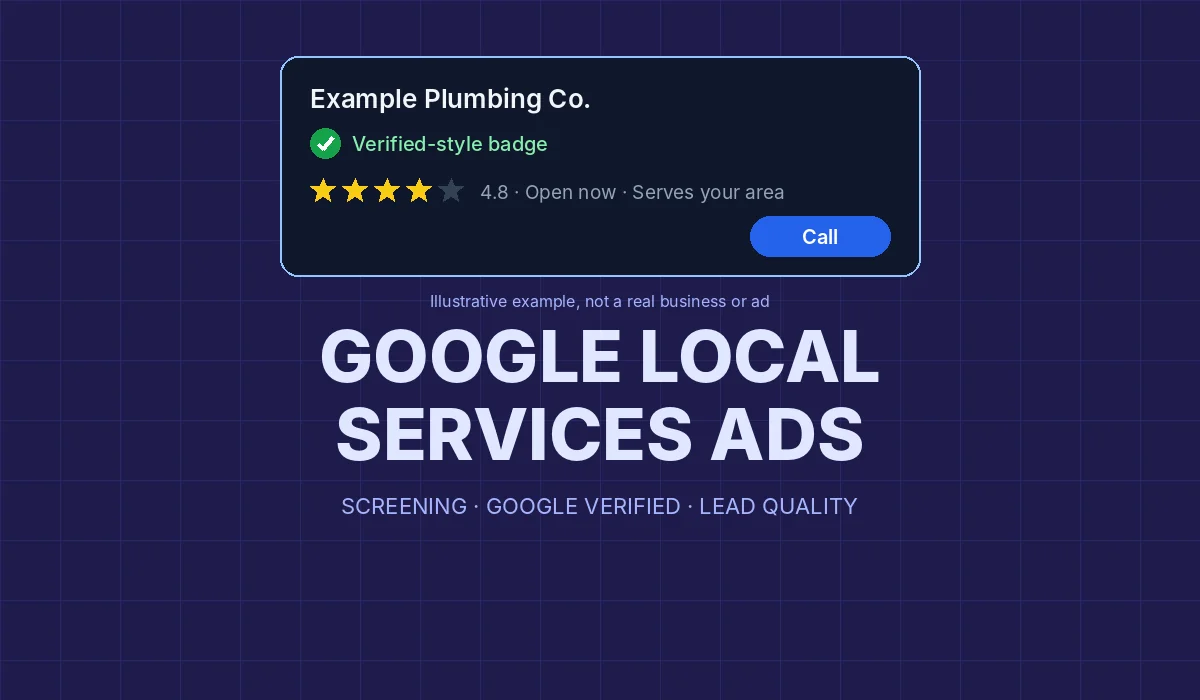
If you run a plumbing, HVAC, electrical, garage door or other home service company, you have probably seen Local Services Ads: the listings with a check mark, a star rating and a call button that show up when someone searches for a service near them. They work differently from regular Google search ads, and the rules around them changed over the past year, including the badge itself.
This guide explains how Local Services Ads work today, what the screening involves, what you are actually charged for, and the settings that decide whether your leads are worth the money. Everything below comes from Google's own help pages, linked inline, as they read in October 2026. Google updates these pages often, so check the current version before you make a budget decision.
How Local Services Ads differ from regular Google Ads
With a regular search campaign using manual cost-per-click bidding, "you pay only when a viewer is interested enough to click your ad" (Google Ads Help: About Manual CPC bidding). A click is not a customer. It might be a shopper comparing prices, a job seeker or someone who leaves your site after three seconds.
Local Services Ads are priced on contact instead. Google's overview says you "only pay when a customer gets in touch from your ad," and calls to the ad's tracking number are forwarded to your business phone (Google Local Services Help: Local Services Ads overview). That model suits businesses whose sales start with a phone call, which describes most home service companies.
The two are not either-or. You can run both: Local Services Ads for the "near me" call, and search campaigns for specific jobs, longer-tail searches and landing pages they control. What matters is knowing which leads each one produces and what each lead costs.
Google Verified replaced Google Guaranteed and Google Screened
For years, home service advertisers earned a "Google Guaranteed" badge, and professional services earned "Google Screened." That is no longer the setup. Search Engine Journal reported in August 2025 that, starting in October 2025, a single Google Verified badge would replace "the Google Guaranteed, Google Screened, License Verified by Google, and the Money Back Guarantee program" (Search Engine Journal: Google confirms new Google Verified badge).
Google's own help page confirms the main points (Google Local Services Help: About Google Verified badge):
- There is now one badge for all advertisers, which Google describes as "simplifying our advertiser badging."
- Existing advertisers who already met the verification requirements got the new badge automatically. New advertisers get it once they meet all verification requirements.
- The Money Back Guarantee tied to the old Google Guarantee badge is discontinued. Customers could only request reimbursement for bookings made before December 7, 2025.
- The badge itself does not affect ad ranking.
Two practical takeaways. First, if your website, truck wraps or sales scripts still say "Google Guaranteed," update them; the program and its money-back promise are gone, and repeating it can mislead customers. Second, don't treat the badge as a ranking boost. Google says plainly that it isn't one. Its value is trust: it tells a homeowner that Google checked something about your business before showing your ad.
What the screening involves
Google says "all businesses must pass Google's screening and verification process" and that the checks can include background checks, business registration, insurance, license and minimum review requirements (Google Local Services Help: Understand the screening and verification process). The exact mix depends on your category.
For home services in the United States, the key points are:
- Owner background checks. "All owners of the business must complete a criminal background check." Workers who perform the core service may also need checks in some categories; office staff and customer support typically don't. Google says businesses "aren't charged for the background check."
- Licenses. Google verifies "applicable state, provincial and/or country-level licenses," and "whenever applicable, each business must be insured" (Google Local Services Help: How providers qualify). The US requirements page lists state-level business and owner licenses and, for many categories, general liability insurance (Google Local Services Help: Business screening and verification requirements).
- Urgent categories get more screening. The same page names electrician, garage door, HVAC, locksmith and plumbing among the categories with extra checks, and says "electricians undergo an additional level of screening, which includes service professional background checks."
- Time. Google says that "on average, this process takes 3–4 weeks to complete after submitting your documents."
- It isn't one-and-done. "From time to time, you may be asked to repeat one or more of these checks," and advertisers are re-evaluated regularly. If a business fails a final check, it has to wait 30 days to reapply, and 180 days after a second denial.
Before you apply, gather your license numbers exactly as the state issues them, a current certificate of insurance, and the legal business name and address that match your Google Business Profile. Mismatched names and expired documents are easy delays to avoid.
Google's getting-started page also describes "pre-badge" ads, which can run with a license or business registration before full verification, but "you'll still need to complete all onboarding requirements to go live with the Google Verified badge" (Google Local Services Help: Getting started with Local Services Ads).
What counts as a lead, and what you're charged for
This is where most of the money is won or lost. Google says "you're charged for each valid lead you receive through your Local Services ad," and that "lead prices may vary depending on your location, the job type, the type of lead, or your bidding mode" (Google Local Services Help: How leads work).
A lead can be:
- A phone call you answer, a callback, or a voicemail.
- A missed call, if "you missed a phone call during your business hours and the customer stays on the line for more than 20 seconds."
- A message (text or email). Google notes that "message leads are typically priced lower than phone leads, although that is not always the case."
- A booking request, where available in the United States.
Two rules protect you from paying twice. Once a lead is charged, follow-up calls or messages with the same customer "are not charged again, provided there is interaction within 15 days and the contact comes from the same phone number or email address." After 15 days of silence, a new contact can be charged as a new lead.
That missed-call rule deserves attention. If your phones go unanswered during the hours listed on your profile, you can still pay for those calls, and, as the next section shows, missed calls also hurt your ranking. Set your listed hours to the hours someone actually picks up.
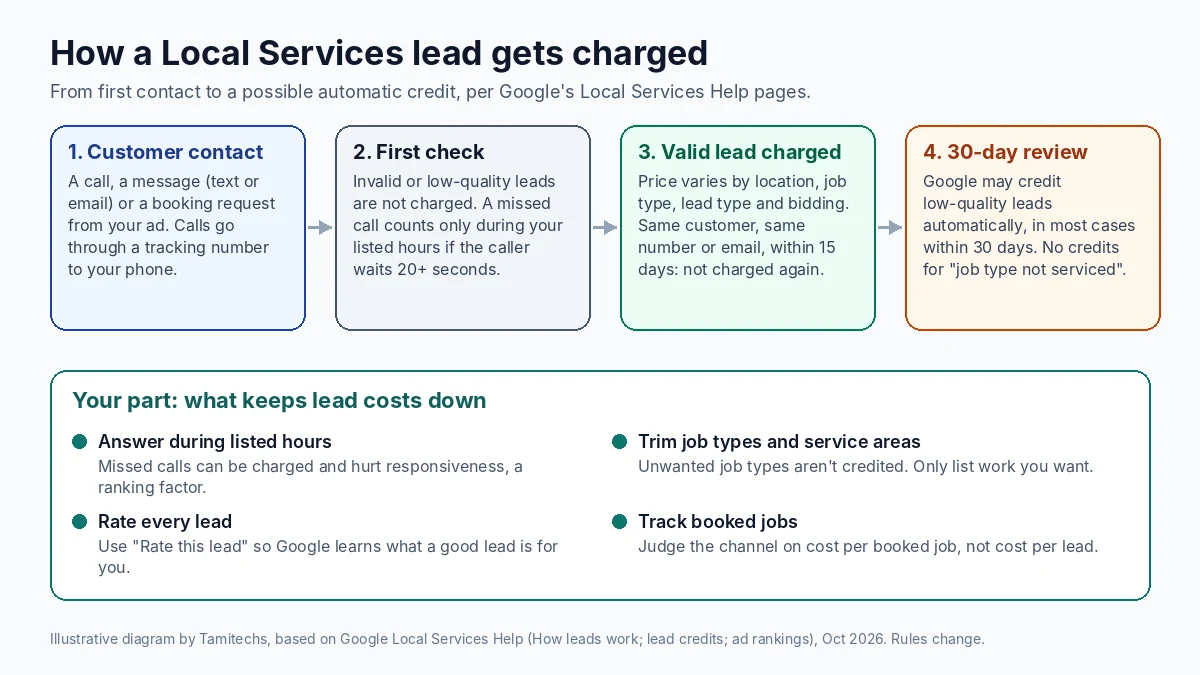
Illustrative diagram by Tamitechs, based on Google's Local Services Help pages on leads and lead credits cited in this article (October 2026). Google's rules change; check the current help pages before relying on a detail.
Bad leads and automatic credits
Not every charged lead is a real job. Google now handles most refunds automatically. Leads judged invalid or low quality at first contact are "not charged," and charged leads are reassessed: Google "continuously assesses lead quality over a 30-day period" and may issue credits automatically for leads it decides are low quality (Google Local Services Help: How leads work).
According to Google's credits page (Google Local Services Help: About automated Local Services Ads lead credits):
- "In most cases, credits will be applied to your account balance within 30 days."
- You can give feedback on any lead with Rate this lead in the Leads section of your account.
- "Google no longer supports credits for 'job type not serviced'" leads. If you're getting calls for work you don't do, Google's advice is to "revisit your service areas, job types, and categories."
That last point is the one owners miss. If you only install residential water heaters, but your profile includes every plumbing job type and a service area that runs two counties past where your trucks go, Google will send you calls you can't take, and you'll pay for them. Trimming job types and service areas is the cheapest lead-quality fix there is.
How ranking works
Paying more does help, but it's only one input. Google's ranking page lists four groups of factors (Google Local Services Help: About ad rankings):
- Your bid. "The amount you bid is the maximum amount you're willing to pay for a lead, though you may end up paying less."
- How likely you are to produce a lead. This includes responsiveness ("missed calls may negatively affect your responsiveness"), the customer's search context, how relevant your services and business bio are, and which lead types you enable. Turning on messages or bookings "means there are more ways for customers to reach you."
- Profile quality. Google lists "your rating, number of reviews, average response time, use of high-quality images" and verification checks, and says "higher quality profiles, including those with images, may rank higher and may also pay lower costs per lead."
- Ecosystem health. Google also balances results so that a range of providers gets a fair chance.
Reviews carry real weight here. Google says "star ratings and number of reviews affect how your business is ranked within Local Services Ads," and those reviews are managed in your Google Business Profile, not in the ads account (Google Local Services Help: Reviews and ratings on Local Services Ads). The same reviews that help you in Maps help you here, so a steady, honest review process pays off twice. Google also warns that "serious or repeatedly negative customer feedback may result in lower rankings (including not showing at all)" (How providers qualify).
If you need a refresher on asking for reviews within Google's and the FTC's rules, our guide to getting more Google reviews the right way applies to any service business, not just movers. And if fake reviews are dragging your rating down, here's what Google removes and how to report it.
Budget and bidding settings
Google offers three bidding approaches (Google Local Services Help: How bidding works):
| Setting | What it does | Google's guidance |
|---|---|---|
| Maximize leads | Google sets bids to get the most leads for your budget | Google's recommended option |
| Target cost per lead | Automated bidding that aims for an average cost per lead you choose | Optional target inside automated bidding (About Target CPL bidding) |
| Max per lead | You set the most you'll pay for a single lead | Manual control, usually fewer leads |
You set an average weekly budget, and Google calculates a monthly maximum from it. "After you've reached your monthly max, your ad won't appear for the remainder of the month (unless you adjust your budget)" (How leads work). Google recommends a budget of at least 10 leads per week and says "it takes about 2 weeks to see accurate results as the model adjusts and learns about your business" (How bidding works).
Our practical advice: don't judge the account in the first week, and don't change bids every day. Pick a budget you can sustain for a month, keep the settings steady for at least two weeks, then compare cost per booked job, not cost per lead.
A lead-quality checklist for home service businesses
Most of the gap between a profitable account and a wasteful one comes down to a few settings and habits:
- Answer the phone during your listed hours. Missed calls cost money and responsiveness. If nobody can answer at 7 a.m., don't list 7 a.m.
- Match job types to the work you want. Turn off jobs you don't do or don't want at your lead price. Google no longer credits "job type not serviced" leads.
- Draw your service area around where your trucks actually go. Wider is not better if the extra miles bring calls you turn down.
- Fill in the profile. Add real photos of your crew, vans and work, and a clear business bio. Google says profiles with images may rank higher and pay less per lead.
- Enable messages if someone can reply quickly. More contact options can help ranking, but a message nobody answers for a day is wasted.
- Rate your leads. Use Rate this lead so Google learns which leads are good for you.
- Track booked jobs, not just leads. Record which leads became paid work. That number tells you whether the channel earns its budget.
- Keep documents current. Licenses and insurance expire. Re-verification requests are normal; respond to them quickly so your ads don't pause.
- Update old badge claims. Remove "Google Guaranteed" and money-back language from your website and marketing.
None of this guarantees a position or a lead volume. Google decides who appears, and results vary by market, category and competition. What these steps do is stop you from paying for leads you can't use, and give Google's system the signals it says it looks for.
Where Tamitechs fits
Local Services Ads work best when the profile, the reviews and the rest of your marketing pull in the same direction. If you're weighing Local Services Ads against search campaigns, or running both, our Google Ads management team can help you compare them on cost per booked job and set up tracking that ties leads to real work. Because the ranking leans on reviews and profile quality, it pairs naturally with our reputation management and SEO and AI search visibility work. If you'd like a second opinion on your account or help getting through screening, get in touch and we'll start with an honest look at what your leads are costing you.
Sources
- Google Local Services Help: Local Services Ads overview
- Google Local Services Help: About Google Verified badge
- Google Local Services Help: Getting started with Local Services Ads
- Google Local Services Help: Understand the screening and verification process
- Google Local Services Help: How providers qualify for Local Services Ads
- Google Local Services Help: Business screening and verification requirements (US)
- Google Local Services Help: How leads work
- Google Local Services Help: About automated Local Services Ads lead credits
- Google Local Services Help: About ad rankings
- Google Local Services Help: Reviews and ratings on Local Services Ads
- Google Local Services Help: How bidding works for Local Services Ads
- Google Local Services Help: About Target CPL bidding
- Google Ads Help: About Manual CPC bidding
- Search Engine Journal: Google confirms new Google Verified badge for Local Services Ads (August 21, 2025)