
Booking From Google's AI Mode: What the New Home-Service Booking Links Mean for Your Business

On November 4, 2026, Google added booking and quote links for home services to AI Mode, the conversational version of Google Search. Robby Stein of Google announced it in a post on X: "Today, we're making it even easier to research & book home services with direct links in AI Mode through partners like" Angi, Thumbtack, Housecall Pro and Jobber, with ServiceTitan "coming soon." He added: "It's available now in the U.S." (Search Engine Roundtable, which reproduces the post).
For a plumbing, HVAC, cleaning or handyman company, this is a real change in how a customer can reach you. A homeowner describes a problem, AI Mode suggests local companies, and some of those companies now carry a button that leads straight to a booking or quote form. This article covers what is confirmed, what each platform says about getting in, what nobody has explained yet, and what to check this week. It reflects the sources as they read on November 13, 2026.
The short version
- What's new: booking and quote links on home-service businesses inside Google's AI Mode, in the United States.
- The way in: an account with one of the launch partners (Angi, Thumbtack, Housecall Pro, Jobber). Google has not announced a route through your own website.
- Cost: Jobber and Housecall Pro both say there are no lead fees for these requests. Angi and Thumbtack are marketplaces with their own pricing, and neither announcement we opened describes fees.
- Not new: Google's AI calling businesses to check prices and availability. That started in July 2025, and you can turn it off.
- Unknown: how AI Mode decides which businesses to suggest in the first place.
What Google launched
Google published no help page or blog post of its own that we could find; the announcement is Stein's post. In it he describes using AI Mode during a plumbing emergency at home: "It handled everything: compared local pricing, checked reviews, and made recommendations based on my situation. I quickly booked a great plumber who came right out and got it fixed" (Search Engine Roundtable). That is one Google executive's own account, not a measured result, but it shows the experience Google is aiming for: describe the problem, compare, book.
Search Engine Roundtable's summary of how it looks is short: "Google adds booking buttons to the home services listing within the AI Mode results." It also notes the feature "is available within the United States only right now."
What the post does not say matters as much. It gives no list of eligible trades, no description of how a business qualifies, and nothing about how AI Mode chooses which companies to show. Keep that gap in mind when anyone tells you they know how to "rank" in AI Mode bookings.
The four ways in, and what each platform says
Each partner made its own announcement, and they don't all describe the same thing.
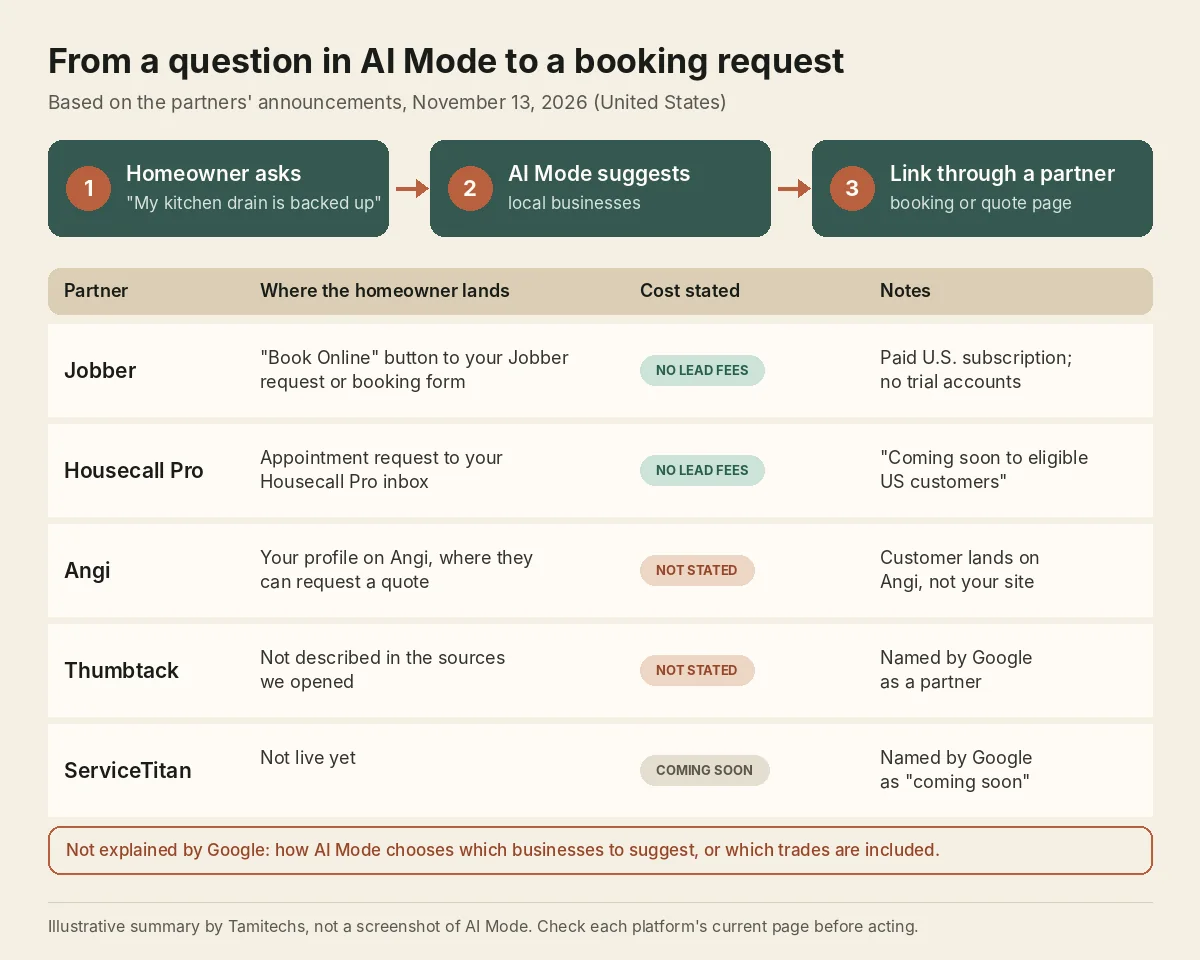
Illustrative summary by Tamitechs of the announcements cited in this article, as of November 13, 2026. It is not a screenshot of AI Mode.
Jobber
Jobber's help article is the most specific. The integration "is available at no extra cost to businesses in the United States with an active, paid Jobber subscription," and "trial accounts can't appear in Google AI Mode." There are "no lead fees for requests that come through Google AI Mode" (Jobber Help Center).
Requests arrive "through the request or booking form you've assigned to Google in Jobber," and Jobber "connects your default request form to Google automatically." The article also says the feature points people "to your real business profile and your actual Jobber booking or request form." To leave, you "turn off Help clients find my business in Company Settings," which "removes your business from Google AI Mode and removes the Book Online button from your Google Business Profile."
Two practical points follow. First, your default request form is now a front door from Google, so read it the way a stranger would. Second, the same setting controls a Book Online button on your Google Business Profile, so check that the profile itself is accurate.
Housecall Pro
Housecall Pro says "all Housecall Pro users will be eligible to appear in AI Mode at no additional cost." Pros "can display their real-time availability, verified reviews and service area, while homeowners can book an appointment directly from the search experience." The request "is sent straight to the selected Pro's Housecall Pro Inbox," with "no associated lead fees or bidding" (Housecall Pro).
One caution: the same announcement ends by saying the integration "is coming soon to eligible US customers." So "eligible" and "live on your account today" may not be the same thing. If you use Housecall Pro, check your account or ask their support rather than assuming.
Angi
Angi's version works differently. "When a homeowner selects an Angi professional surfaced through AI Mode, they are directed to that professional's profile on Angi, where they can learn more about the pro and request a quote" (Angi press release, via Finviz). The customer lands on Angi, not on your site or your scheduling tool. The release doesn't describe what pros pay for those requests, so treat them like any other Angi lead until Angi says otherwise.
Thumbtack and ServiceTitan
Google named Thumbtack as a launch partner and ServiceTitan as "coming soon." We found no announcement from either describing how it works, so we can't tell you more than that yet.
What if you use none of these?
As announced, the booking links run through the partners. Google has not described a way for a business to add its own booking link to AI Mode.
That doesn't remove you from AI Mode's answers. It means a homeowner who sees you there reaches you the usual ways: your Business Profile, a phone call, your website. Google's Business Profile help does let you add a booking provider or your own booking link to your profile ("You can also add your own link to your Business Profile") and says provider links "will show up on your Business Profile within a week" (Google Business Profile Help: Set up bookings through a provider). That page is about your profile, not AI Mode, and Google hasn't said profile booking links carry over into AI Mode. It's still worth doing, because the profile is where many of these customers end up.
We would not switch field service software for this feature alone. It is nine days old, the eligible trades aren't published, and nobody outside Google has data on how many bookings it sends. If you're already choosing between platforms, it's a fair item to add to the comparison.
The other AI Mode feature: Google calling you about prices
This one is older, and plenty of owners still don't know about it. In July 2025, Google announced "AI-powered calling to local businesses": Search "can now call businesses to get pricing and availability information on your behalf," then gathers the answers "from different businesses to present you with a range of options" (Google, The Keyword, July 16, 2025).
Google's help page for businesses explains what to expect. When customers use Search or Maps for these requests, "Google might contact your business on their behalf through an automated phone call." For price checks, "if you share this info with Google, the customer receives an email or SMS text that includes your business's product details or service quote." Google says it "limits the number of calls for the same info and avoids calling during late night or early morning hours," and that in the U.S. the feature "is available in all states except Indiana, Louisiana, Minnesota, Montana, and Nebraska" (Google Business Profile Help: About automated calls and texts from Google to your business).
The same page includes a warning worth passing to whoever answers your phone: "Google will never ask for payment, credit card information, or account passwords." A caller asking for money to keep you listed is not Google.
Should you opt out?
You can. Google says "businesses are always in control via their Business Profile settings." On a call, you can say "Please stop calling my business." Or, on a verified profile, go to Business Profile settings, then Advanced settings, and under "Google automated calls and text messages" turn off "Bookings and inquiries from customers" (Google Business Profile Help).
Think before you do. A price-check call is a customer comparing options. If your team hangs up on the automated voice, the customer gets quotes from the companies that answered. We'd rather prepare than opt out: tell the people on your phones these calls are real, and give them a short, honest answer for common jobs, such as a diagnostic fee and a typical range with "final price after we see it." If your pricing truly can't be given by phone, opting out is reasonable.
What to check this week
- If you're on Jobber: confirm your subscription is paid (not a trial), find "Help clients find my business" in Company Settings, and decide whether you want it on. Then open your default request form and fill it in as a customer would.
- If you're on Housecall Pro: ask whether the integration is live on your account yet, and make sure your availability and service area in the platform are current.
- If you're on Angi or Thumbtack: update your profile, photos and services. That profile is where an AI Mode visitor lands.
- Everyone: check your Google Business Profile for the right categories, services, hours and service area, and add a booking link if you have online booking.
- Everyone: decide your answer to price-check calls and brief the front desk.
- Watch response time. A booking request that sits unanswered until tomorrow is a lost job, whichever platform delivered it.
- Note where requests come from. Jobber and Housecall Pro deliver these inside their own tools; ask each how AI Mode requests are labeled so you can count them separately from other leads.
What we don't know yet
- How AI Mode picks businesses. Google hasn't said. Being on a partner platform makes a booking button possible; nothing published says it makes you more likely to be suggested.
- Which trades are included. The announcements say "home services" and "local pros" without a list.
- How many bookings this sends. No public numbers exist yet.
- Whether fees stay at zero. Jobber and Housecall Pro say no lead fees today. Neither promises that forever.
We'll update this article when Google or the partners publish more.
How this fits with the rest of your visibility
A booking button only helps if AI Mode suggests you in the first place, and the basics behind that haven't changed: an accurate Business Profile, steady genuine reviews, and a website that states plainly what you do, where, and for whom. Our guides on AI search visibility for HVAC and plumbing companies and why ChatGPT recommends your competitor walk through those checks, and the Ask Maps article covers what Google's AI reads from your profile.
How we can help
We help home service businesses, including HVAC and plumbing companies, get the groundwork right: Business Profiles, SEO for Google and AI search, and websites with booking and quote forms that are quick to complete on a phone. We can't promise that AI Mode will suggest your business, and nobody honestly can. We can make sure that when it does, the path from question to booked job has no broken steps. If you'd like us to review your setup, get in touch.