
Schema Markup for AI Search: What Helps, What Doesn't, and What Google Actually Says

A common pitch in 2026 goes like this: "AI search engines read schema, so add our special markup and ChatGPT will recommend you." It sounds plausible. It's also not what Google says.
This article sets the record straight. Structured data, the code that labels what's on a page (your business name, address, a product's price, an article's author), is still useful. But it's a way of describing your content accurately, not a shortcut into AI answers. Here's what Google says, what's worth adding for a service business and the mistakes to avoid.
What Google says about schema and AI features
Google's documentation for site owners on AI Overviews and AI Mode is direct:
- "There are no additional requirements to appear in AI Overviews or AI Mode, nor other special optimizations necessary."
- "You don't need to create new machine readable files, AI text files, or markup to appear in these features. There's also no special schema.org structured data that you need to add."
- Among the SEO basics that still apply: "Making sure your structured data matches the visible text on the page."
So the question isn't "which schema gets me into AI answers." It's "does my structured data accurately describe what's on my pages?" If it does, you've done what Google asks. If it doesn't, you have a problem.
What structured data still does
Structured data has two jobs.
It makes pages eligible for rich results. Rich results are enhanced search listings, such as breadcrumb trails or event details. Google's general guidelines say they apply to all structured data and "must be followed in order to be eligible for appearance as a rich result in Google Search" (Google Search Central).
It removes ambiguity. Labeling your business name, address, phone and service area in a standard format makes it easier for any system to read those facts correctly. That doesn't guarantee anything, but it removes one source of errors.
What structured data doesn't do is guarantee a feature. Google's guidelines say "Using structured data enables a feature to be present, it does not guarantee that it will be present."
Which formats to use
Google supports three formats: JSON-LD, Microdata and RDFa, and lists JSON-LD as "recommended." JSON-LD is a block of code in the page's head or body that doesn't change what visitors see, which makes it the easiest to maintain.
One technical rule worth knowing: "Don't block your structured data pages to Googlebot using robots.txt, noindex, or any other access control methods." Markup on a page Google can't crawl does nothing.
The schema types that matter for a service business
You don't need dozens of types. For most service businesses, a small, accurate set covers it:
| Type | Where | What it describes |
|---|---|---|
| Organization or LocalBusiness | Home page and About page | Business name, logo, address, phone, service area, links to official profiles |
| Service | Each service page | The service offered and the area served |
| BreadcrumbList | Every page below the home page | Where the page sits in your site structure |
| Article or BlogPosting | Blog posts | Headline, author, publish and update dates |
Every value in these should match what a visitor can see on the page and in your Google Business Profile. If your page says you serve "Miami-Dade and Broward," your markup shouldn't claim the whole state.
An example: a plumbing company's home page
Here's what accurate markup looks like in practice for a plumbing company that serves two counties.
The home page carries one LocalBusiness block. It names the business exactly as it appears on the sign and in the Google Business Profile, gives the street address and main phone number, lists the two counties as the service area, and links to the company's official profiles. Each value is something a visitor can also read on the page: the phone number in the header, the address and service area in the footer, the profile links in the footer icons.
Each service page, such as water heater installation or drain cleaning, describes that one service and the same service area. Blog posts carry Article markup with the real author's name and the real publish and update dates.
What's missing is just as important: no review stars for reviews that aren't shown on the page, no FAQ block for questions the page doesn't answer, and no claim to serve cities the company doesn't actually cover.
FAQ and HowTo markup: what changed
Many sites still add FAQPage and HowTo markup expecting expanded search listings. Google changed both in 2023:
- FAQ rich results "will only be shown for well-known, authoritative government and health websites. For all other sites, this rich result will no longer be shown regularly."
- HowTo rich results were first limited to desktop, and then Google confirmed: "Google Search no longer shows How-to rich results on desktop, which means this result type is now deprecated."
If you already have this markup, there's no need to rip it out. Google notes that "Structured data that's not being used does not cause problems for Search, but also has no visible effects in Google Search." Just don't spend new effort on it expecting results. A plain, well-written FAQ section on the page is still useful to readers, and to AI systems that read the visible text.
Mistakes that can cost you
Google's quality guidelines for structured data list the mistakes to avoid. The ones we see most often on service business sites:
- Marking up content that isn't on the page. Google: "Don't mark up content that is not visible to readers of the page."
- Fake or misleading reviews in markup. Google: "Don't mark up irrelevant or misleading content, such as fake reviews or content unrelated to the focus of a page."
- Misrepresenting who you are. Google: "Don't impersonate any person or organization, or misrepresent your ownership, affiliation, or primary purpose."
- Stale information. Google: "Provide up-to-date information." Old hours or a former address in your markup work against you.
The consequence of getting it badly wrong is a structured data manual action. Google says this means "a page loses eligibility for appearance as a rich result; it doesn't affect how the page ranks in Google web search." You can check for one in the Manual Actions report in Search Console.
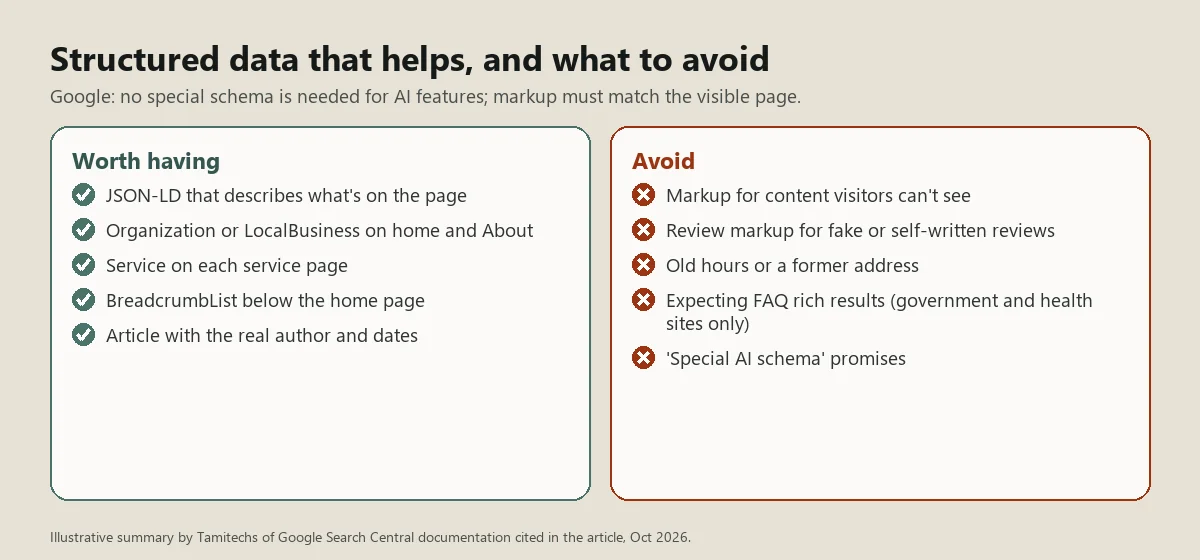
Illustrative summary by Tamitechs of the Google Search Central documentation cited in this article (October 2026).
A simple schema audit
You can check your own site in under an hour:
- Run your home page, one service page and one blog post through Google's Rich Results Test.
- For each item the test finds, compare every value to what's visible on the page: name, address, phone, hours, prices, author, dates.
- Remove any markup describing things that aren't on the page.
- Make sure the business details match your Google Business Profile exactly.
- Check the Manual Actions and Enhancements reports in Search Console.
If you find markup that a plugin or past developer added and nobody understands, it's usually safer to remove it than to leave inaccurate data in place.
Where schema fits in AI search
Structured data is one small piece of being understood by search engines and AI tools. The bigger pieces are crawlable pages, clear text that answers real questions, consistent business information and a good reputation. Our GEO guide covers the full checklist.
Our SEO team audits structured data as part of every technical review, and our website development team builds clean, accurate markup into new sites from the start. Contact us if you'd like your site checked.
Sources
- Google Search Central, AI features and your website (last updated December 10, 2025)
- Google Search Central, General structured data guidelines
- Google Search Central Blog, Changes to HowTo and FAQ rich results (August 8, 2023, updated September 14, 2023)