
Zero-Click Searches: How Service Businesses Still Win Calls and Customers

A "zero-click search" is one where the person gets what they need from the results page itself and never visits a website. They read the AI summary, glance at the map listings, tap "Call" on a business profile, or simply move on.
For publishers that live on page views, that's a real problem. For a local service business, it's a shift in where the decision happens, not the end of search as a lead source. A homeowner who calls you straight from your Google Business Profile never visited your website, and it's still a lead. This article looks at what the data shows and how to make sure those no-click moments still end in calls and booked jobs.
What the data shows
The clearest independent data comes from Pew Research Center, which analyzed the actual Google searches of 900 U.S. adults in March 2025 (Pew Research Center):
- About one in five searches showed an AI summary. 18% of all searches in the study produced one.
- Clicks drop when a summary appears. Users clicked a traditional search result in 8% of visits to pages with an AI summary, and in 15% of visits to pages without one.
- Few people click the links inside the summary. That happened in just 1% of visits to pages with a summary.
- More sessions simply end. Users ended their browsing session on 26% of pages with an AI summary, compared with 16% of pages with only traditional results.
- Most searches end without a click either way. Around two-thirds of all searches ended with the user browsing elsewhere on Google or leaving without clicking a search result.
- Longer questions trigger summaries more often. Just 8% of one- or two-word searches produced an AI summary, compared with 53% of searches with 10 or more words.
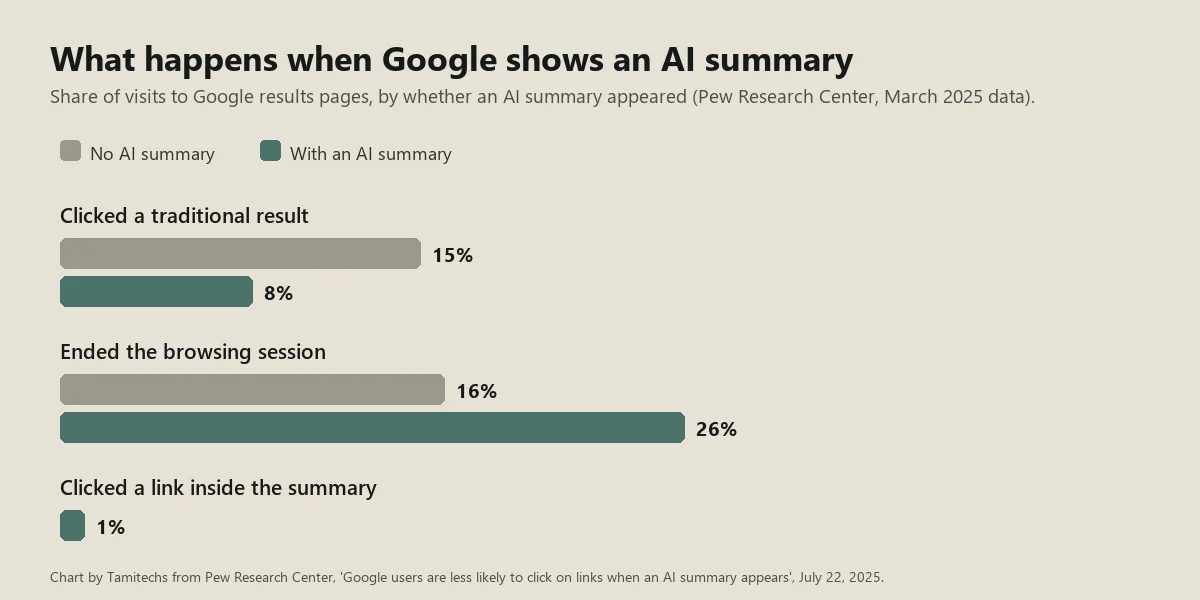
Chart by Tamitechs from Pew Research Center data (July 22, 2025).
Google's own guidance adds one more data point worth knowing: it says that when people click from results pages with AI Overviews, "these clicks are higher quality (meaning, users are more likely to spend more time on the site)" (Google Search Central).
Put together: you should expect fewer website visits from informational searches, but the visits you do get may be from people further along in their decision.
Where the decision happens now
For local services, much of the decision moves to three places on the results page itself.
Your Google Business Profile. Google lets profile owners see how customers interact with their listing on Search and Maps, including calls ("the number of times a customer clicked on the call button"), direction requests, website clicks and the search terms people used to find the business (Google Business Profile Help). Every one of those can happen without a website visit.
The AI summary itself. If an AI answer names your business, explains what you specialize in or cites your page, it shapes the customer's shortlist before they click anything.
Reviews and third-party sites. Searchers who don't click your site still read your star rating, recent reviews and what others say about you.
Five ways to turn zero-click searches into revenue
1. Make your Business Profile do the selling
Treat your Google Business Profile like a landing page. Keep hours accurate, especially holiday and after-hours availability, because "Open now" is a deciding factor for urgent jobs. Choose precise categories, list your services, add photos of real recent work, and post updates. Respond to every review. Google's AI features guidance also tells businesses to make sure their Business Profile information is up to date.
For moving companies, our guide to Google Business Profile setup and suspensions covers category and service-area rules in detail.
2. Be the source the AI summary is built from
A business that's cited in an AI answer gets visibility even when nobody clicks. Google says pages must be indexed and eligible to show with a snippet to be used as supporting links, and that AI features may run several related searches across subtopics to build an answer. Clear, specific pages that answer your customers' real questions give those searches something to find. Our GEO guide walks through the full checklist.
3. Build brand searches
When someone searches your business name, the results page is mostly about you: your profile, your reviews, your site. Brand searches come from offline and online word of mouth, trucks and yard signs, repeat customers and referrals. They're also the searches least affected by AI summaries, because the person already knows who they want.
4. Give people a reason to click
Searches with commercial intent still lead to clicks when the website offers something the results page can't: an instant quote form, online booking, a cost calculator, before-and-after galleries, or financing details. Make sure those are easy to find from the page Google is most likely to show.
5. Track the actions that don't involve a visit
If you only measure website sessions, zero-click searches look like losses. Add these to your monthly report:
- calls, direction requests and website clicks from your Business Profile performance report
- impressions and clicks in Search Console (Google says AI Overviews and AI Mode traffic is included in the Performance report under the "Web" search type)
- calls and form leads tracked by source; our guide to tracking AI search traffic in GA4 shows how to set that up
A month where website visits dip but profile calls rise is not a bad month.
A 20-minute monthly zero-click check
Once a month, set aside 20 minutes for this routine:
- Search your five most common customer questions in Google, including one in AI Mode. Note whether an AI summary appears, which businesses or sites it cites, and whether you're among them.
- Open your Business Profile performance report. Write down calls, direction requests and website clicks, and compare them with last month and the same month last year.
- Read the search terms people used to find your profile. New terms can point to services you should describe more clearly on your site.
- Check Search Console for pages whose impressions rose while clicks fell. Those are often questions now answered on the results page. Make sure those pages give a clear reason to call or book.
- Note your newest reviews and make sure every one has a reply.
After three months you'll have a simple picture of whether search is still producing leads, even if your website traffic tells a different story.
Should you pay to get around it?
Paid ads are another way to be seen on commercial searches, and many home service trades can also use Google's Local Services Ads. Ads can make sense for high-intent searches like "emergency plumber near me." They work best on top of a strong profile and good reviews, not as a substitute. Our guide to Local Services Ads for home service businesses covers how those work, and our Google Ads management team can help you decide whether paid search is worth it for your market.
The bottom line
Zero-click searches change where customers decide, not whether they decide. Service businesses that keep their profiles complete, earn steady reviews, answer real questions clearly on their sites and measure calls as well as clicks are in a good position as AI summaries spread.
Our SEO and AI search team helps service businesses make that shift. Contact us for a review of where your search leads come from today.
Sources
- Pew Research Center, Google users are less likely to click on links when an AI summary appears in the results (July 22, 2025)
- Google Search Central, AI features and your website (last updated December 10, 2025)
- Google Business Profile Help, Understand your Business Profile performance and insights